Problem with the Recent Posts Element

Hello Guys!

The Recent Posts Element is a bit of a Problem for me right now. I have had this Problem for a while now:
I have a website for my youth-church: youth-church

Every week we upload a new “post” with just a discription and a Image.
The Image is always rectangle!

I have two Problems:

  1. On the Homepage I have inserted the “Recent Posts Element”. But it always changes the format of the image, so that it doesn`t show the image correctly anymore! What can I do to change this? I just want the Image to be shown. (PS: If the Image would have the same height, it would be great! I just whant the weidth to be adjusted)
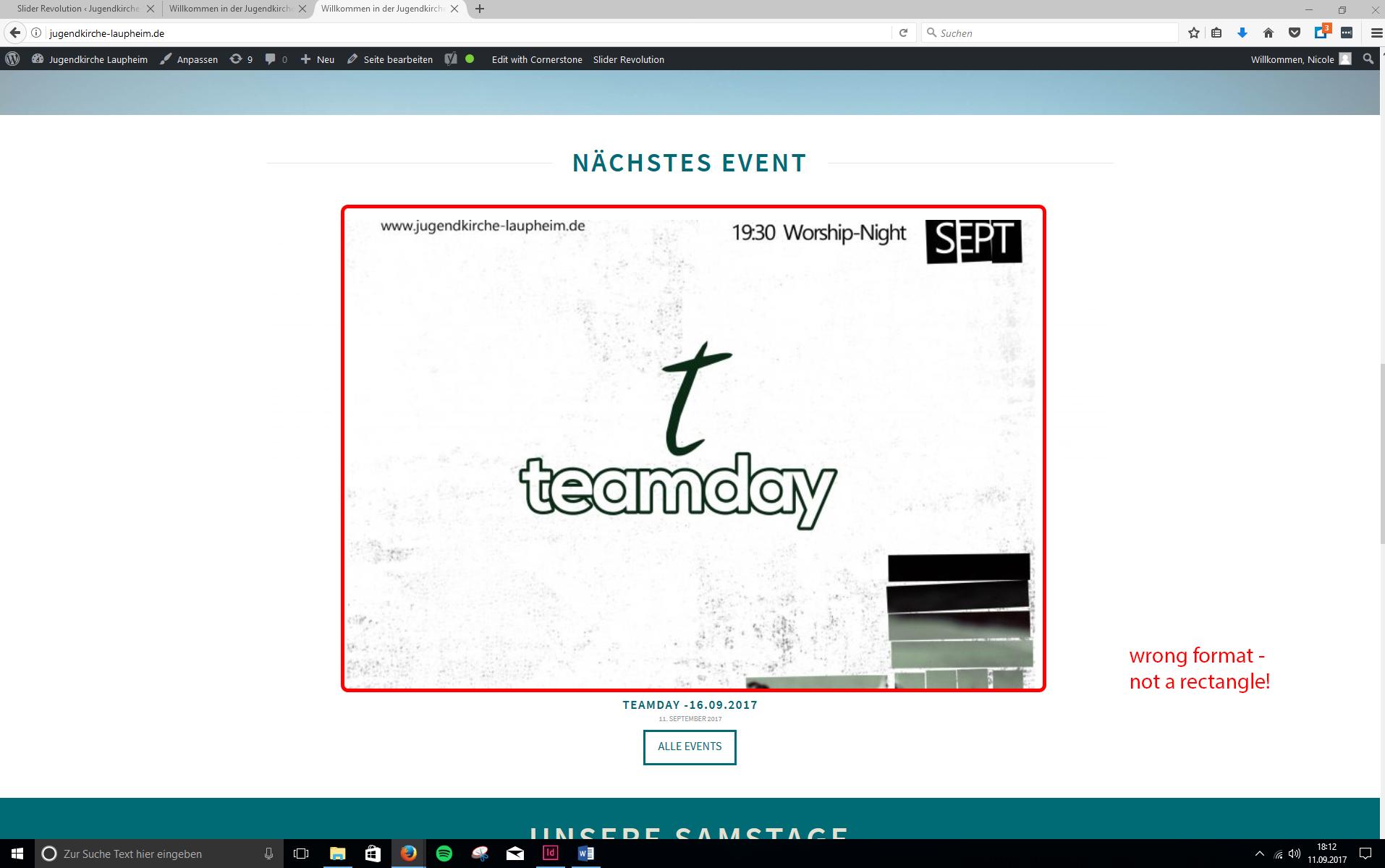


  2. I don`t really know how to discripe this Problem, but I will try my best: The Images we upload are usually always in a very large size. Whenever I just take the file, upload it to wordpress and use it as an Image for a Post/ Blog, it is not shown correctly - it zooms into the image. (Similar as in the first Problem, with the only difference, that it still has it’s rectangle format). So everytime I want to upload an Image, I have to take it into InDesign, open a new Dokument with the Format of 400px X 400px, and then place the Image in it a bit smaller, so that when it zoomes into it, it is shown the right size. (Since it then cuty off the withe edge, and not the image).
    Now - as you can propably imagine - this is a huge work-around, and really annoying! Can you please help me - so that I can just upload the Image, no matter which Size it it, and it will be shown correctly?
I really hope you can help me!! Especially the first Problem is really urgent! :wink:

Greetings, and thank you!
Nicole

Hi Nicole,

1.) I can see you are using Ethos stack. By default, images on recent post element using this stack was added as background image and the size is set on the stack CSS. We can adjust it using custom CSS though. See this: https://screencast-o-matic.com/watch/cbQlj7IIpK

Try this CSS

.x-recent-posts .x-recent-posts-img {
    padding-bottom: 56.25%; /*Reduce this value accordingly*/
   }

Note that your original image: http://jugendkirche-laupheim.de/wp-123e8-content/uploads/2017/09/td-881x492.jpg has white part on left and right. The background will adjust base on its height and width proportion. Yes, it is rectangle just because it has white part on left and right. When viewed on the page, this white part on left and right blend with the background and we’re only seeing the not so rectangle part of the image.

2.) I can see you have added this:

a.entry-thumb {
    padding-bottom: 90%;
}

No need to adjust the image. As long as you have adjust that padding. Yes, by default it is also rectangle but that padding will adjust the display of the image like recent post element the image is use as background and not display as image element.

Hello Lely,

Thank you so much for your reply!
I think I have difficulties explaining what the actual problem I am having, since english ist not my first language :wink:

I tried that, but the problem is not the padding - the problem is the way the picture is displayed. The top and bottom of the picture is cut out - Maybe the following screenshot wizll explain my problem better!

How can I solve this problem?

With kind regards,
Nicole :smiley:

Hi there,

The image itself is clipped http://jugendkirche-laupheim.de/wp-123e8-content/uploads/2017/10/WhatsApp-Image-2017-10-02-at-10.13.26-881x492.jpeg

How about using the grid or essential grid on this setup? You can decide which image and size, or content to display. The existing recent post element has no other features or options, it’s for simple implementation.

Thanks!