Problem with targetin id and setting separate background images

Hi I got this code from forum and tryied to fit to my page but it does not seem to work. on order online page and
I don’t understand why, since it does work on workshop one and home.
thank you for your help. I want to have separate header background picture for each page.
here is code some pictures are not uploaded yet since it stoped working for odrer one.:
My page. test.kniharium.eu
/*
// Background pictures queries
*/

@media (min-width:1680px){

.page-id-312, .x-navbar{
background: url(‘http://test.kniharium.eu/wp-content/uploads/2017/07/h1920.jpg’)
no-repeat,bottom,center;}

.page-id-146 .x-navbar{
background:url(’’)
no-repeat,bottom,center;}

.page-id-154 .x-navbar{
background:url(’’)
no-repeat,bottom,center;}

.page-id-143, .x-navbar{
background:url(‘http://test.kniharium.eu/wp-content/uploads/2017/07/o1920.jpg’)
no-repeat,bottom,center;}

.page-id-312 .x-navbar{
background: url(’’)
no-repeat,bottom,center;}

.page-id-142, .x-navbar{
background: url(‘http://test.kniharium.eu/wp-content/uploads/2017/07/w1920.jpg’)
no-repeat,bottom,center;}

}

@media (min-width:1328px) and (max-width:1680px){

.page-id-312, .x-navbar{
background: url(‘http://test.kniharium.eu/wp-content/uploads/2017/07/h1680x1328.jpg’)
no-repeat,bottom,center;}

.page-id-146 .x-navbar{
background: url(’’)
no-repeat,bottom,center;}

.page-id-154 .x-navbar{
background: url(’’)
no-repeat,bottom,center;}

.page-id-143, .x-navbar{
background: url(‘http://test.kniharium.eu/wp-content/uploads/2017/07/o1680x1328.jpg’)
no-repeat,bottom,center;}

.page-id-312 .x-navbar{
background: url(’’)
no-repeat,bottom,center;}

.page-id-142, .x-navbar{
background: url(‘http://test.kniharium.eu/wp-content/uploads/2017/07/w1680x1328.jpg’)
no-repeat,bottom,center;}
}

@media (min-width:1024px) and (max-width:1328px){

.page-id-312, .x-navbar{
background: url(‘http://test.kniharium.eu/wp-content/uploads/2017/07/h1328x1024jpg.jpg’)
no-repeat,bottom,center;}

.page-id-146 .x-navbar{
background: url(’’)
no-repeat,bottom,center;}

.page-id-154 .x-navbar{
background: url(’’)
no-repeat,bottom,center;}

.page-id-143, .x-navbar{
background: url(‘http://test.kniharium.eu/wp-content/uploads/2017/07/o1328x1024.jpg’)
no-repeat,top,center;}

.page-id-312 .x-navbar{
background: url(’’)
no-repeat,top,center;}

.page-id-142, .x-navbar{
background: url(‘http://test.kniharium.eu/wp-content/uploads/2017/07/w1328x1024.jpg’)
no-repeat,bottom,center;}
}

@media (min-width:980px) and (max-width:1024px){
.page-id-312, .x-navbar{
background: url(‘http://test.kniharium.eu/wp-content/uploads/2017/07/h1024x800jpg.jpg’)
no-repeat,bottom,center;}

.page-id-146 .x-navbar{
background: url(’’)
no-repeat,bottom,center;}

.page-id-154 .x-navbar{
background: url(’’)
no-repeat,bottom,center;}

.page-id-143, .x-navbar{
background: url(‘http://test.kniharium.eu/wp-content/uploads/2017/07/o1024x800.jpg’)
no-repeat,bottom,center;}

.page-id-312 .x-navbar{
background: url(’’)
no-repeat,bottom,center;}

.page-id-142, .x-navbar{
background: url(‘http://test.kniharium.eu/wp-content/uploads/2017/07/w1024x800.jpg’)
no-repeat,bottom,center;}

}

hope prt sc will appear:
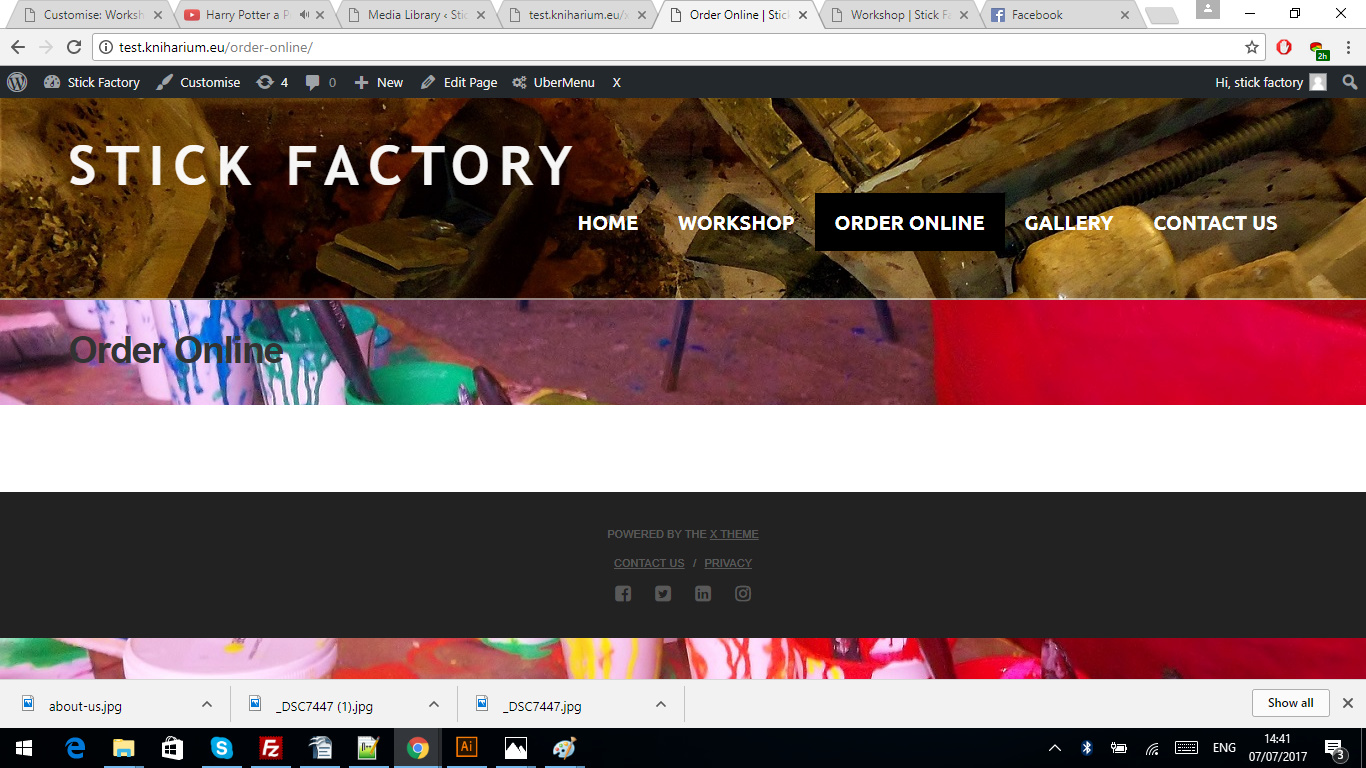
Thank you. Best Regards!
Kristina

Hi There,

Please update your custom CSS to this:

/*
// Background pictures queries
*/

@media (min-width:1680px) {

    .page-id-312 .x-navbar {
        background: url('http://test.kniharium.eu/wp-content/uploads/2017/07/h1920.jpg') 
	no-repeat,bottom,center;
    }

    .page-id-146 .x-navbar {
        background: url('') 
	no-repeat,bottom,center;
    }

    .page-id-154 .x-navbar {
        background: url('') 
	no-repeat,bottom,center;
    }

    .page-id-143 .x-navbar {
        background: url('http://test.kniharium.eu/wp-content/uploads/2017/07/o1920.jpg') 
	no-repeat,bottom,center;
    }

    .page-id-312 .x-navbar {
        background: url('') 
	no-repeat,bottom,center;
    }

    .page-id-142 .x-navbar {
        background: url('http://test.kniharium.eu/wp-content/uploads/2017/07/w1920.jpg') 
	no-repeat,bottom,center;
    };
}

@media (min-width:1328px) and (max-width:1680px) {

    .page-id-312 .x-navbar {
        background: url('http://test.kniharium.eu/wp-content/uploads/2017/07/h1680x1328.jpg') 
	no-repeat,bottom,center;
    }

    .page-id-146 .x-navbar {
        background: url('') 
	no-repeat,bottom,center;
    }

    .page-id-154 .x-navbar {
        background: url('') 
	no-repeat,bottom,center;
    }

    .page-id-143 .x-navbar {
        background: url('http://test.kniharium.eu/wp-content/uploads/2017/07/o1680x1328.jpg') 
	no-repeat,bottom,center;
    }

    .page-id-312 .x-navbar {
        background: url('') 
	no-repeat,bottom,center;
    }

    .page-id-142 .x-navbar {
        background: url('http://test.kniharium.eu/wp-content/uploads/2017/07/w1680x1328.jpg') 
	no-repeat,bottom,center;
    };
}

@media (min-width:1024px) and (max-width:1328px) {

    .page-id-312 .x-navbar {
        background: url('http://test.kniharium.eu/wp-content/uploads/2017/07/h1328x1024jpg.jpg') 
	no-repeat,bottom,center;
    }

    .page-id-146 .x-navbar {
        background: url('') 
	no-repeat,bottom,center;
    }

    .page-id-154 .x-navbar {
        background: url('') 
	no-repeat,bottom,center;
    }

    .page-id-143 .x-navbar {
        background: url('http://test.kniharium.eu/wp-content/uploads/2017/07/o1328x1024.jpg') 
	no-repeat,top,center;
    }

    .page-id-312 .x-navbar {
        background: url('')  no-repeat,top,center;
    }

    .page-id-142 .x-navbar {
        background: url('http://test.kniharium.eu/wp-content/uploads/2017/07/w1328x1024.jpg') no-repeat,bottom,center;
    };
}

@media (min-width:980px) and (max-width:1024px) {
    .page-id-312 .x-navbar {
        background: url('http://test.kniharium.eu/wp-content/uploads/2017/07/h1024x800jpg.jpg') no-repeat,bottom,center;
    }

    .page-id-146 .x-navbar {
        background: url('')  no-repeat,bottom,center;
    }

    .page-id-154 .x-navbar {
        background: url('')  no-repeat,bottom,center;
    }

    .page-id-143 .x-navbar {
        background: url('http://test.kniharium.eu/wp-content/uploads/2017/07/o1024x800.jpg') no-repeat,bottom,center;
    }

    .page-id-312 .x-navbar {
        background: url('') no-repeat,bottom,center;
    }

    .page-id-142 .x-navbar {
        background: url('http://test.kniharium.eu/wp-content/uploads/2017/07/w1024x800.jpg') no-repeat,bottom,center;
    };
}

Hope it helps :slight_smile:

Hi this code does not work at all, I tried it. Any other ideas? Thank you.

Hello There,

The code partially works in your Order online page. You can check out my screenshot: http://prntscr.com/fts2n1
To resolve this, please make use of this code block instead:

.page-id-143 .x-navbar {
        background: url('http://test.kniharium.eu/wp-content/uploads/2017/07/o1024x800.jpg') no-repeat bottom center;
        background-size: cover;
    }

Hope this helps. Please let us know how it goes.

Hi, thanks for background size tip very handy, yeah the code from your colleague did not work, but for some reason, when I rewrote my code once again, and load background picture first on problematic page and then only others of them it worked. Thanks for all the help.

You’re welcome! :slight_smile:

Glad to know it’s working now.

This topic was automatically closed 10 days after the last reply. New replies are no longer allowed.