Problem with Cornerstone Front End

Dear Themeco-Support,

I updated on of my pages to the newest Pro-Version. All worked fine, I edited the menu and changed some content. But from one day to another cornerstone stopped working and shows this failure message: “A conflict on the front end of your site has prevented the preview from loading.” I tried to deactivate several plug ins and also switched back to an earlier version of the site with no result. What do I need to do, to get cornerstone working again?
Hi,

Upon checking, I can see mixed content errors in the console.

Please add the code below in your wp-config.php file located at the root directory of your site.


define('WP_HOME','https://www.japan-dialog.de');
define('WP_SITEURL','https://www.japan-dialog.de');

No need to add it if it is existing already, you just need to change http to https

Hope that helps.

Hi Paul,

thanks for your help. I added the code to the wp-config.php, but unfortunately nothing has changed. I still get the same error message. Do you have another solution?

Hey @dogpile,

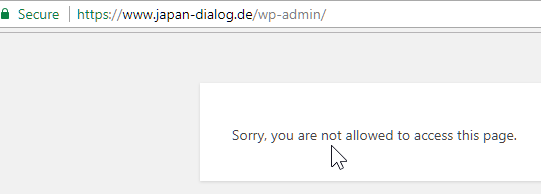
Please remove the code provided by @paul.r in the previous reply and give us proper access to your WordPress admin so we could see what errors are generated when you open the content builder. Right now, I could not get in.

For now, please check for the following:

  1. Clear all caches including browser cache then deactivate your caching plugins and other optimization plugins.

  2. If you’re using a CDN, please clear the CDN’s cache and disable optimization services.

  3. Test for a plugin conflict. You can do this by deactivating all third party plugins, and seeing if the problem remains. If it’s fixed, you’ll know a plugin caused the problem, and you can narrow down which one by reactivating them one at a time.

  4. Remove custom CSS, Javascript and templates.

  5. Reset your htaccess file by renaming it to .htaccess-bak. Then in WP Admin Menu, go to Settings > Permalinks and just click the Save Changes button.

  6. Contact your host to increase your allocated memory or do it yourself by adding this code in your wp-config.php

define( 'WP_MEMORY_LIMIT', '256M' );
define( 'WP_MAX_MEMORY_LIMIT', '512M' );

Thanks.

Hey Christian,

thanks for looking into it. I solved it some minutes ago. I turned of multisite enviroment, changed the wpml language links to ‘domain.tld/language/’ and saved the permalinks. Now cornerstone ist working again, still with little bugs but the site can be edited again.

Hey There,

We are just glad that you have figured it out a way to correct the said issue.
Thanks for letting us know!

Best Regards.

This topic was automatically closed 10 days after the last reply. New replies are no longer allowed.