Problem since wordpress 6.2

Hi,

We are getting the following error on some, but not all pages since the 6.2 problem. We have the lastest version of the theme and Wordpress is version 6.2.

do you know what the error is? The page in question here is https://www.20minutos.es/servicios/productos-financieros/prestamos-online/los-mejores-microcreditos/

Hi Pontus,

Thanks for reaching out.
If that only happens to a few pages, the problem might be on those pages only. I suggest you check by deleting the section of the specific pages one by one till the issue is fixed, and the last one you have deleted before the fix is the actual issue. If that does not help, please provide login credentials for your site in a secure note to examine it further, including:

– WordPress Site URL & Login URL
– WordPress Admin username/password

To create a secure note, click the key icon underneath any of your posts.

Thanks

Hi,

We can’t try that since we can’t use the builder at all on the affected pages. I created a user for you and sent the affected pages that we know of in a secure note.

Hi Pontus,

I have saved the first page in the list as a Template and created a new page with it. And it is loading perfectly fine in the Cornerstone page builder. You can follow the same process described below for the other pages.

  1. Open the affected page.
  2. Save that page as Template.

  1. Create a New Page. And Use Template to load the saved one.

  1. You need to change the name and the slug of the newly created page according to the page from where you inserted the content.

Hope it helps.
Thanks

Hi,

Would this not mean we create a new URL? We need to keep our old URLs as we rely on SEO and they are ranking well at the moment.

Hi Pontus,

That is why I have suggested you change the page name and slug after copying the content to the new page. So the SEO and the ranking will be the same as previously.

Thanks

Hi again,

Just so I don’t missunderstand here, we would need to create a new page, with a new url, and a new slug to post this new content to it? Since the other URL is already taken, we would need to redirect it to the new one then?

If so, that’s not something we want to do since it has SEO implications.

Is there any way to get to the bottom of what is causing this issue? It arose with the new Wordpress and theme update.

Hello Pontus,

Please note that if you clone the page it would create a new page slug, in case you want to have the same page slug you need to rename the old page slug and then add you need to rename the newly cloned page slug as your old page slug in that you can have same page URL as your old page URL. Or you may delete the old page and then you can add the same page slug to the newly constructed page.

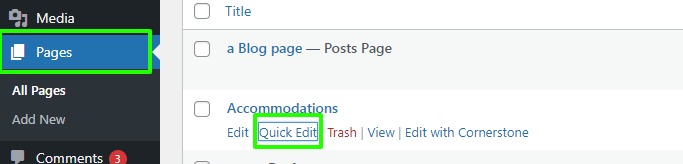
You need to go to the Page -->select the page —> click on the Quick Edit—>Add the slug there in the Slug text field.

Pages-‹-Themeco-—-WordPress

Hope it helps
Thanks

This topic was automatically closed 10 days after the last reply. New replies are no longer allowed.