Pro theme: off canvas doesn't always open

I have 2 off canvas buttons on my page- please view on mobile or make browser smaller to see the mobile footerbar thing
http://staging1.kidsmagicworld.com.au/zxxx/

the middle menu and the right quick quote do not always open when tapped on my mobile.

I am using a blackberry passport- I am currently testing with facebook friends to see if it opens up on their phones- but anything on your end- do you know if blackberries don’t work too well with it or if some phones don’t allow it

it sometimes works and sometimes doesn’t which is troubling- no plugin conflict as I don’t have any plugins installed as yet and its been happening since the start

is it possible to remove the mouse over bit- why? because its not needed on mobiles- thats causing the issue

when I tap- its causing the mouse over to happen and not the link- it doesn’t need the mouse over effect- tap and go

how do I remove the mouse over effect- is this css or is this javascipt

Hi,

Try to set the height of your bar and off canvas element to auto.

That will allow it to expand when the text go three lines.

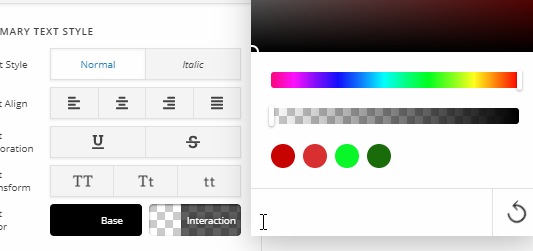
To turn off hover effect, you need to turn off Particle set-up of your off canvas element.

Thanks

the particle effect is off already

the mouse over element is nothing to do with the partcle effect it has to do with the interaction side of things which is never needed on a mobile device
watch the video below - how do I hide that mouse over- as in the interaction

I would say only on extremely rare cases does a button on a mobile device require a hover effect- you are either touching the screen or not you don’t hover over a button on mobiles

Hey there,

Regretfully, there’s no way to disable the Interaction. But, you don’t need CSS either because you can simply set the Interaction color and/or opacity the same as the Base color. See https://youtu.be/7483G25_Y1k

Hope that helps.

thats not the point- the point is not to hide the color change the point is to remove the change from happening-

why? because when people touch the menu- it doesn’t open- thats a pretty bad thing

simply changing the color to be the same does not fix the issue of clicking a button and it not doing what it is supposed to do

could you let me know what file to open- I’d love to have a menu that works

If you don’t want the same color approach, you can also leave the Interactive color empty.

That won’t stop the x-interactive from being added though. The code for that is in the minified JS file pro\cornerstone\assets\dist\js\site\cs-body.js but note that we do not support any modification for this.

If the solution is still not good for you, regretfully, you will have to use HTML or other third party button shortcode.

Please also note that the x-interactive class does not affect the functionality of the buttons (Off Canvas Toggles) like what you claim. I’ve also tested your buttons and they work on my end all the time.

Blackberry Passport is also an old phone so it may not support the Off Canvas feature. We also do not support it. If you need your site to work for that system, you need to simplify your site’s features.

Thank you for understanding.

This topic was automatically closed 10 days after the last reply. New replies are no longer allowed.