Pro Theme Conflict With Yoast

Hi,

I have just developed a problem on my website (details via private message) which I have not seen before.

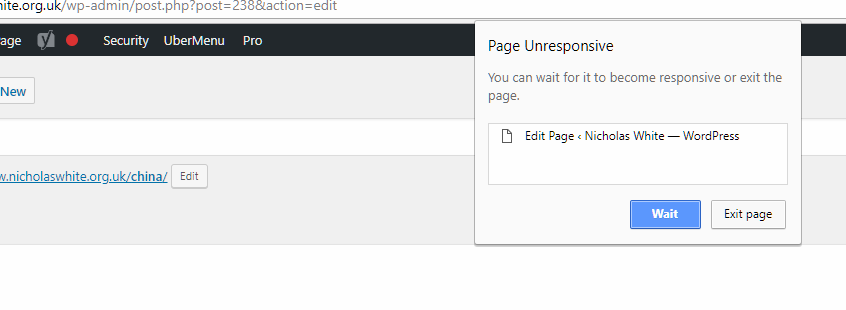
If I click on Page and then open a page to change its layout, the whole web browser freezes. It will not let me navigate away, refresh, or do anything. Even closing the browser takes substantial time.

I have isolated the problem down to Yoast. By deactivting the plugin I can do everything normally.

Do you have any idea how to resolve this issue, or are you seeing it elsewhere?

Thanks,
Christopher

Hi there,

Thanks for writing in.

Maybe I know which layout? Is it the template? Please provide a video recording of how to reproduce this issue. I can’t promise any solution since it could be related to 3rd party plugin. But I can gather information that I can add to our issue tracker.

Thanks!

Hi Rad,

A video will not really help you. The whole screen simply freezes, not allowing any action within the whole browser - including closing the browser itself. You would only see the cursor move and the long-running script eventually pop up.

I am not sure if an update has since come through, but it is sort of behaving again. I have managed to re-run the same issues with a new page without problems.

Thanks!

Sorry,

The problem is not resolved. Yoast is activated, but please look at the screenshot, which clearly shows an error
Any ideas how to overcome this?

Thanks,

Hey There,

When using Yoast SEO plugin, please ensure that the “Cornerstone Content” option is enabled in SEO > General > Features.

To find more about this, please check the documentation: https://yoa.st/dashboard-help-cornerstone?php_version=5.5.38&platform=wordpress&platform_version=4.9.5&software=free&software_version=7.2&role=administrator

Hope this helps.

I’m afraid that did not help - Cornerstone content switch was already on!

I am not sure if this has any relevance, but I have noticed that this problem is only happening to those pages which have an Envira Gallery loaded into a section’s row. Any page without Envira Gallery is behaving normally.

Hey @cdnwhite,

Thanks for the additional info. Yes, it might have something to do with Yoast - Envira conflict. But, it’s pretty old.

I checked a page with Envira gallery and I experienced the issue. What is actually happening is the page still loads but it’s very slow. Sometimes the browser prompts if you wish to continue and after clicking Wait and waiting for the page to load completely, the page becomes usable again until you edit some info in Yoast then it freezes again.
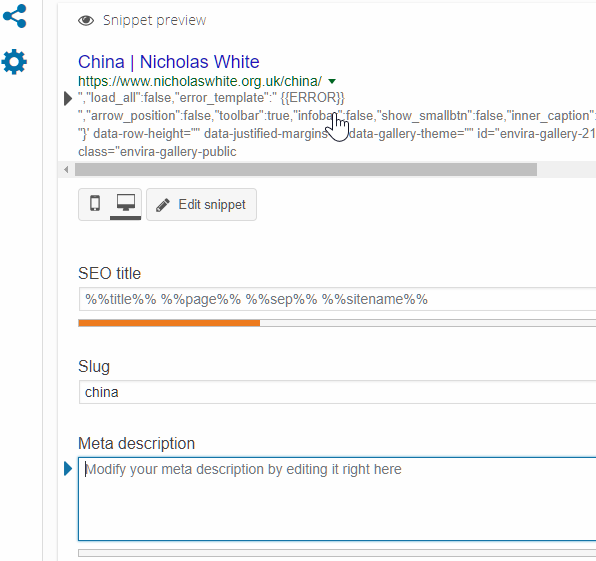
I have replicated this in my test site and just simply placing the Envira shortcode only in the default WordPress editor makes the page freeze. The freezing on my end takes a short time only though compared to your page. I believe this has to do also with how much content you have in the page.

Also, I have tested using the default WordPress theme and the issue persists so Pro has nothing to do with the conflict.
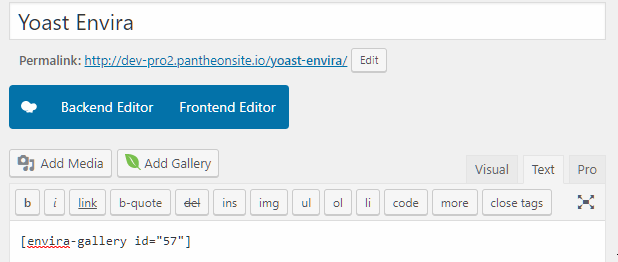
I’ll forward this to our issue tracker but for now, you will need to disable either one of the conflicting plugins. It would also be best to forward this to Yoast SEO support.

I’d also would like to make it clear that the Cornerstone content option in Yoast SEO is not connected to Pro’s content builder (Cornerstone).

Thanks.

Thank you for the comprehensive help! I am going to forward this link to your response to Yoast, as it will no doubt affect other Yoast users as well.

You’re most welcome! And yes, you may forward it. Thanks!

Hi,

I have some news on this issue. I contacted both Yoast and Envira Gallery about it, copying this thread.

Envira have responded and have also come across the same issue on Friday. Below is a part of their response.

“We actually discovered that late Friday morning as well. We have a hot fix that should go out tomorrow to correct this and a couple of other things.”

The hotfix is about to be released, and I have asked them if they will be making sure that you receive it so you can pass it out to your customers. I am sure you will be getting it through your normal channels with Envira.

Hopefully the hotfix will be available nice and quickly!

Thanks again.

Hey There,

Once the hot fix is available, we will be pushing it to our Themeco plugin repository so that it will be available in Automatic updates right in your dashboard.

Thank you for your understanding.

This topic was automatically closed 10 days after the last reply. New replies are no longer allowed.