Hello there.
I can’t excess the last page in the content list in the editor because its partially hidden and I already scrolled to max bottom of it.
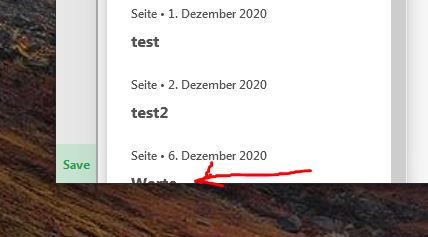
Hi Ondrej,
Sometimes the only screenshot doesn’t help us to recognize the issue you are having. Can you please provide login credentials for your staging site in a secure note to examine it further, including:
– WordPress Site URL & Login URL
– WordPress Admin username/password
To create a secure note, click the key icon underneath any of your posts.

Thanks
Hi Ondrej,
I hope you find a workaround for your issue and share with us the workaround for your issue so that everyone can follow it.
Thank you.
hello marc_a
Well for the content list I just choose the page directly from the wp backend and not the editor itself. Its a really minor bug. I just mentioned it, because I doubt it’s by design.
Regarding the content dock - well nobody complained yet, but I realized the cookie not doing its job though. So here’s my workaround - ignore it, until someone complains. And it might be a caching issue as well…
The same for the missing audio element in the MS Edge browser… It is just this browser only - and again, nobody complained yet.
I have couple of rendering issues in the editor while setting up device’s layouts… I need to jump from one device resolution to an another to see the changes… again I can live with it, but it’s definitely not by design.
I already mentioned that in an another thread. If there’s something else I don’t like I solve it via css or php, I’m not going to bother you with issues I have a solution for. A lot is text related and I guess by design.
Example: I insert text into the text element in the html mode. Going back to rich text a p tag is automatically wrapped around. I have to close the text editor window in html mode to avoid the p tag.
Or the usage of flex box in connection with grid element and content alignment. The editor is not really intuitive here. I’m not sure, while using grid element and having the option to use flex box is helpful.
The grid element is really great while setting up responsive layouts. It would be great to be able to change the text paragraph orientation (centered, left, right) the same way. right now it is not possible via editor but custom css… or having two different text elements with the same content and hide or show them based on screen size. I mean in one text element the text is aligned to left and shown on desktop and notebook screen sizes and in the other text element, the text is centered and shown on mobile devices only.
I guess the custom css is the way right now.
I see this as “first world problems” hence I’m not really complaining.
EDIT: just one more thing. Can you guys have a chat with YOAST developement to make cornerstone and yoast coexist in friendship? I have to explain all the time to my clients that the red dots in the backend are not really a seo issue, but yoast not being able to read cornerstone content properly. I know, you’ll point the finger right at yoast… well… I know I know.
Hi Ondrej,
Regarding the <p> tag, the <p> tag can be added from Rich Text editor by adding an Enter or New Line, and can be seen in HTML editor. For your case, it’s best to disable it in X/Pro > Settings > User Preferences.
For the rest of the problem we need to check your website by logging in, can you please provide login credentials for your site in a secure note to examine it further, including:
– WordPress Site URL & Login URL
– WordPress Admin username/password
To create a secure note, click the key icon underneath any of your posts.
Thanks
Hey Ondrej,
It is good to know that everything is going well now already.
You are most welcome.
Cheers.
This topic was automatically closed 10 days after the last reply. New replies are no longer allowed.