Pro Page Builder [re-opening ticket]

Hi @christian_y

https://theme.co/apex/forum/t/pro-page-builder/20245/4

Re-opening the above ticket. I spoke with the plugin support and they did look at your reply too. I’ adding his reply below:

Your 1st first statement was:

All the actions of the Cornerstone are saved as meta options inside the options table.

Not sure what they mean by “actions” it states this information is stored in the WordPress options table.

Your next statement was:

Cornerstone’s data is saved in the post meta as serialized data.

Which states that “data” is saved in the “post meta”. Not sure what is the distinction between “actions” and “data”? Not sure whether “post meta” means the actual postmeta table or does it mean as some sort of post metadata stored within the posts table rather than the postmeta table?

I would note that they also state this information in the “post meta” is stored as serialised data - it would be unusual to store serialised data in the posts table so maybe they do mean the postmeta table.

But in general I don’t think the response from the developers/support of that functionality actually answers your question so it does not really help you.

If they were to provide an action that can be hooked into if present and which they execute when their functionality saves something then that would be a possible way that editing by that functionality could be “counted” and it could be an enhancement request that we could consider or something that you could “patch” in yourself for example.


Thoughts?
Hi there,

Let me explain the Cornerstone functionality in details. It seems that the plugin developer misunderstood our statement.

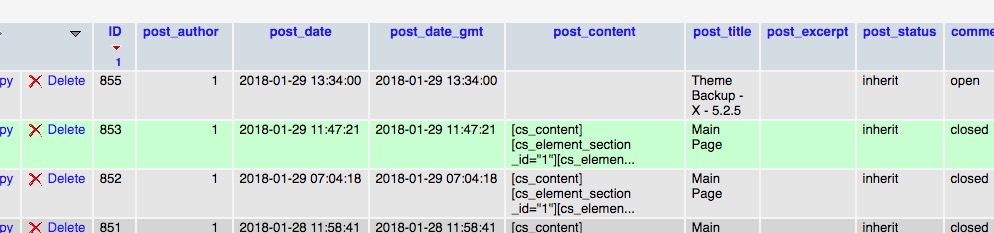
Here we are talking about the database tables. Cornerstone has two parts when it comes to saving. The first section is the content of the page which is the shortcodes generated by the elements you drag to the screen. That section is saved as a post content in the posts table:

Check the post_content column in the screenshot above. In the example above, the post id is 853.

Now there are other settings also which needs to be saved such as the custom CSS and JS code you add as a custom code and also there is data related to the layout and is most related to sections and their options. Now that information is saved in the post_meta table.

As you can see in the screenshot for the page ID 853 there are 3 rows in the posts_meta which saves information about settings and data also the version of the Cornerstone.

Your backup plugin should backup those tables to be able to make Cornerstone work properly.

Please kindly consider that this is something related to a 3rd party plugin and is outside of our support scope. You will need to follow up the case with the developer of the plugin.

Thank you for your understanding.

This topic was automatically closed 10 days after the last reply. New replies are no longer allowed.
