Pro: Make section full width

G’day just trying to figure out how to make a section full width from side to side.

Also off topic- its hard to search the forum because you have both pro and x bundled up together- I search and get X results which is of no help

this page here http://staging1.kidsmagicworld.com.au/zxxx/ scroll to the bottom where the accordians are-how to make that accordian full width
I’d like to do this on other pages as well with different elements so perhaps you could let me know the way to do it
Hi There,

Thanks for writing in!

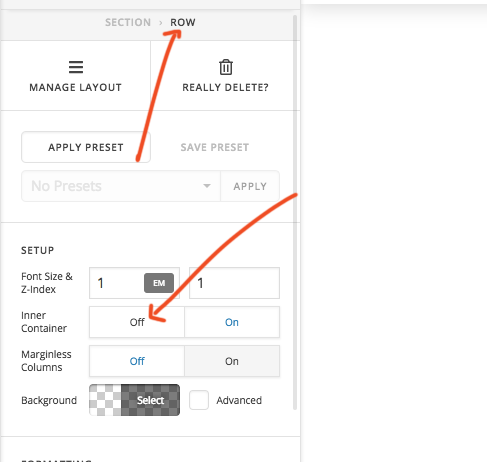
Please make the section row inner container off.

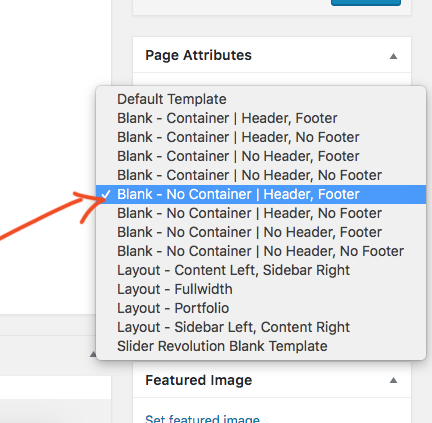
Before that, your page template should be blank, no conyainer\header and footer.

This applies to all other page and section which needs to be full width.

Thanks

where do I find page attributes?

found it but that doesn’t work

how do I make 1 section full width?

see video below

Hi @b960a518-a049-4215-9,

The page template is still using the default one instead of the blank container, I can verify it through the site’s source code. Though, I could see that it’s already set in your video. Perhaps it’s due to cache or similar, would you mind providing your admin login credentials so we could check it?

With internal cache issue where changes aren’t taking effect, I recommend switching to another staging where it will work properly. Because no matter what you do, it will be just the same.

Thanks!

no I changed it back after creating that video because it wasn’t working

OK I have figured the full length bit out however now its made the background white see video below

how do I get rid of this white background? so I can see the background image

this does not work
.page-template-template-blank-4-php .x-main, .page-template-template-blank-5-php .x-main, .page-template-template-blank-6-php .x-main, .page-template-template-blank-8-php .x-main {
background-color: none;
}
or
.page-template-template-blank-4-php .x-main, .page-template-template-blank-5-php .x-main, .page-template-template-blank-6-php .x-main, .page-template-template-blank-8-php .x-main {
background-color: none !important;
}

OK I think I have the solution so for now no need to reply- frustrating!
