PRO - Latest version: bunch of errors

Hi,

I got a bunch of errors. Nothing new but since it’s been already 2 weeks, I had to make this post:

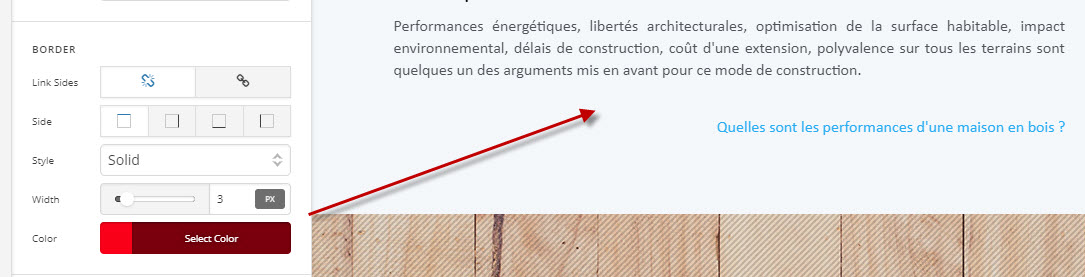
1 - borders are not visible while editing the page, header or footer

2 - colors are not set correctly so when you save the page, you can notice errors in the console: “Unable to resolve color: hsl(181,2%,92%) transparent transparent transparent Error: Unable to parse color from string: hsl(181,2%,92%) transparent transparent transparent”. Also, when you get back to the page, you can’t change the color because X doesn’t understand the value.

3 - style binding issues: “Binding style attributes may introduce cross-site scripting vulnerabilities; please ensure that values being bound are properly escaped.”

4 - “DEPRECATION: A property of <cornerstone@view:-outlet::ember754> was modified inside the didInsertElement hook. You should never change properties on components, services or models during didInsertElement because it causes significant performance degradation. [deprecation id: ember-views.dispatching-modify-property]”

5 - Lato is set as default and visible on the front even if there is no Lato selected in the Fonts manager

6 - The default commented message for JS is always visible on the front even if not used.

// No need to add script tags
// here; simply get started
// by writing JavaScript!
// Remember to save your
// changes to see them :slight_smile:
//

7 - How to get rid of the x-generated-css that polute the page code? I’d rather use an external file. (Forget the copy paste solution. I’m looking for something dynamic).

ETA of the fixes?

PS: it’s a brand new website, only 2 modules but doesn’t matter, PRO.

Thanks
Hey @lijecreative,

If you’re referring to the menu item unlinked border, there’s currently no news or a fix for it. Please stay tuned.

Would you mind giving us the steps to replicate these issues? It would be best to open a separate thread for each issue to avoid confusion.

  1. In Appearance > Customize, select system fonts under Typography and Header

  2. There’s no news when the fix will be included. Please stay tuned. For now, please manually delete it.

  3. This requires custom development which is outside the scope of our support. You’ll need to seek help from a third party developer for this.

Thank you for understanding.

Hi,

1 - Any borders. This one should be above the text:

2 - In fact I think this is the rgb border color that’s beeing translated into hsl that’s why I can’t see it:

3 - Chrome browser, console while editing a page with cornerstone
4 - Chrome browser, console while editing a page with cornerstone
5 - Imo, when the user choose to use the fonts manager, it should override these font selectors.
6 - got it
7 - You should work on it. This isn’t effective for seo.

Thanks

Hey There,

Would you mind providing us with login credentials so we can take a closer look? Please provide following information:

Set it as Secure Note

  • Link to your site
  • WordPress Admin username / password

All the best!

Alright, please find bellow the credentials.

Hello There,

Thanks for providing the information.

1.) This is a known bug in the latest release. Once our developers have fix this, it will be updated and rolled out in out next update.

2.) This is also brought to the attention of our developers. I has been added to our issue tracker along with the #1 issue you are having.

3.) and 4.) These are JS warnings and not an error. This could happen because of unset variables like the colors happening for the border. This should be gone when issue #1 and #2 will be resolved.

5.) When font manager is active, it is advisable that you will have to go to each of the options like

7.) X generate css is the font, colors, etc. settings that you have set in the theme options (customizer). Cornerstone css is on a page by page specific basis. Having to apply this custom css into a one single css file would mean loading the whole entire file in all your pages even if some of the styles will not be applied ad use on the current page.

Hope this helps.

This topic was automatically closed 10 days after the last reply. New replies are no longer allowed.