Hello @eyedia,
Thanks for writing to us.
You can go to Headline element and click on the “customize” button and then add a custom class there.
Now add this custom CSS code under X/Pro—>Theme Option -->CSS.
@media(max-width:480px){
.heading-center h1.x-text-content-text-primary {
text-align: center !important;
}
}
Please make sure you have the same setting for your Headline Element where you have selected “Tag” as “h1”
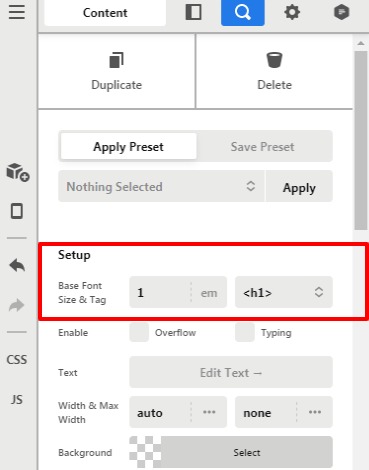
Please feel free to change the custom class name as per your need. Please make sure you have changed the class name from the code in case if you have changed the class name from the element.
The purpose of providing the custom CSS to show you how to add CSS code to your site. Writing custom CSS is outside the scope of our theme support. If you need more customization, you need to learn CSS and learn how to use the browser’s element inspector.
Hope it helps.
Thanks

