Pro Header - Text next to Logo and lines above menu items

Hi there

I have set out the menu which has a logo and then some text next to it. I have used the image element for the logo and the headline element for the text. However it is not responsive and when the screen changes size everything goes in the wrong place.

Is there another way to do this or will I have to do the logo with the writing as an image?

Also

I would like to put a line above the menu items and one below the menu items. Not to go right across the page just to go above the items.

Could you please advise if this is possible.

Thank you.

Kind regards

PS I attach an image of what it should look like

Hi There,

The best way to add the text is in the image so that it wouldn’t create an issue.
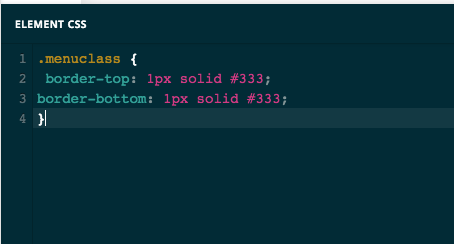
For the border top and bottom, You can use custom CSS to do this.

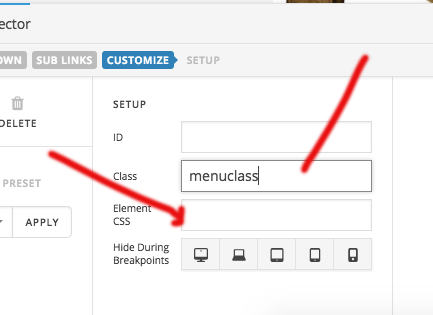
Just give a class name to the menu element. and add this CSS to the. class.

.menuclass {
    border-top: 1px solid #333;
    border-bottom: 1px solid #333;
}

Hope this helps!

Thanks

Hi Basanta

Thank you for that. Funnily enough it did not work adding the css directly on the header but it did when I added it in customiser !

One thing though - the lines are right at the edges and I want to have them nearer to the actual menu text.

Thank you.

Kind regards

Hi There,

Thanks for the update!

The border depends on the menu size. As you have padding on both sides of menu items so it too hard to put the border till the text.

As your site is in coming soon mode, I cant see the menu to suggest you better.
Hope this is clear to you.

Thanks

Hi Basanta

Thank you didnt think to check that - now all perfect.

Thanks for your help.

You are most welcome!

This topic was automatically closed 10 days after the last reply. New replies are no longer allowed.