Pro header shrink amount view width

hi there,

is it possible to set the shrink amount in the header in relation to the view width?

i made an menu where this would be great. or is there a css work around?

in secure note you can look at the header. when scrolling down and resize the width in chrome you see that there is so much empty space on top of the logo and menu.

thanks in advance for your help.

cheers
is it possible to change the non shrinking height too?

Hello Harald,

Thanks for writing in!

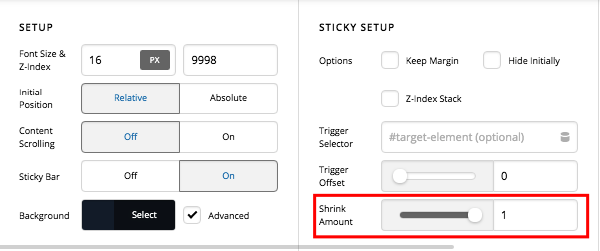
To prevent the header from shrinking, please set the “Shrink Amount” in the bar settings to 1.

We would love to know if this has worked for you.

hi,

hm i dont know if i described it correctly (my english isnt that good).
the header should shrink!
but the shrink amount should be in correlation with the view width of the device. so if the width of the device is 1200 or above the shrink amount should be 0.7.
when the device has a sidth of 800 the shrink amount should be 0.5.

or is it better to set the height of the bar in correlation to the view width?
can you help me out and give me the right selector for the menu bar? is it: .x-bar-top?

thanks in advance

okay i figured it out.
i did 5px padding top and bottom for the image container. set the bar height to 7.6vw with an shrink amount of 0.7
and did a “scaling text” (font-size for min-width 767 and max-width 900: 0.8vw) in css for different device widths.
the same for the logo image-
now it worked like it should in my case :slight_smile:
thanks again

Hey Harald,

We’re glad that you figured that trick out. That is correct. :slight_smile:

This topic was automatically closed 10 days after the last reply. New replies are no longer allowed.