Hi,
My site is at www.imprintphotobooths.co.uk.
The drop down menu seems not to work
I’ve cleared the cache etc and asked others for support.
Please can you assist?
Many thanks
Matthew
Hi,
My site is at www.imprintphotobooths.co.uk.
The drop down menu seems not to work
I’ve cleared the cache etc and asked others for support.
Please can you assist?
Many thanks
Matthew
Hey Matthew,
Thanks for writing in! I have checked your page and there is a JS error. This could be the cause why your dropdowns is not working. You have inserted a css code in the custom JS section which generated an error. Please remove this:
.home .x-navbar {
    background-color: rgba(0,0,0,0.25) !important;
    position: absolute;
    width: 100%;
}
.home .x-navbar .x-nav-wrap .x-nav > li > a {
    color: #fff;
}
You are supposed to insert a custom css code in the X > Launch > Theme Options > Global CSS (http://prntscr.com/evui3r)
I also noticed that you are using CloudFlare. Please login to your CloudFlare account and purge your site cache. For best results, please use the recommended CloudFlare settings found in this link: https://xthemetips.com/using-cloudflare-rocket-loader-with-x-pro-and-x5/928/
Please let us know how it goes.
Thanks for the reply.
I’ve removed the odd css code (which I think was from a previous site design).
I’ve purged the cache.
Cloudflare has been set to paused for a while whilst I troubleshoot this error - is that ok?
Anything else I can check?
Many thanks
Matthew
Hey Matthew,
Please ensure Bar’s Content Scrolling is off. Content Scrolling is mostly used for mobile horizontal menu without submenus.
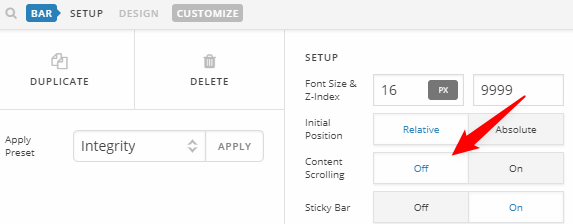
Thanks.
This topic was automatically closed 10 days after the last reply. New replies are no longer allowed.