Pro Header is so confusing... arrrrgh!

I can see the potential of Pro Headers, and I’ve used premade Header templates, but for a newbie, it is so confusing and frustrating. Yes, I’ve read the Pro Help page (which doesn’t go into enough detail) and I’ve had a look at Youtube tutorials (too advanced). I’m sick of trying one thing and then having the whole Header fall over. Please, please help.

Here is the home page of my dev site with a standard top header (logo centre with a centred menu below). What I want to change is the white down arrows, the black bgrd dropdown menu and the awful Navigation Collapsed Graphic. https://arthousetradingco.com/

Here is my testing page with a customised Pro Header https://arthousetradingco.com/testing/

But, the top half of my logo is hidden and the submenu dropdowns are not directly under the menu bar. Why? I just don’t get it.

Hello Paul,

Thanks for writing in!

Kindly edit your header and do the following:

1.) Set the height of your bar to auto

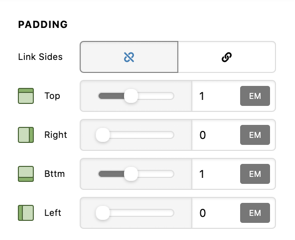
2.) Add some top and bottom padding, still in the bar settings:
CDaTbXXkSl_5KwgLOnKz3g

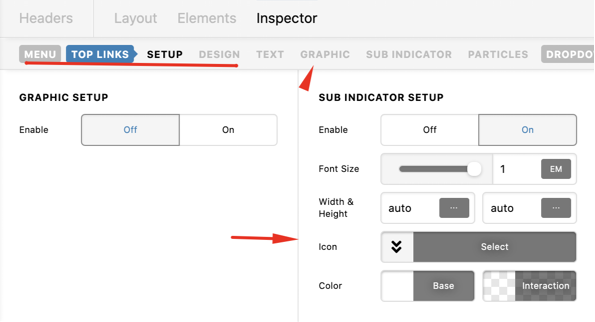
3.) Click the Navigation inline element and change the toplinks submenu icons.
GOOqhq4tT8ukvPMQW9M7WA

We would love to know if this has worked for you. Thank you.

Hi Runel, thank you for your reply. While I was waiting, I explored another option with two bars that gave me a satisfactory result. I did look at your suggestion, which has given me a bit more insight into creating custom headers. Thank you for your time.

You are most welcome.
If you need anything else we can help you with, don’t hesitate to open another thread.

This topic was automatically closed 10 days after the last reply. New replies are no longer allowed.