Hi,
as you can see on the picture below the bar is a flexbox and the three containers are centered as a group. In my case in need to center especially the Logo wich is located at the second container…
What do i need to do, to fix this?
Thx. 
Hi,
as you can see on the picture below the bar is a flexbox and the three containers are centered as a group. In my case in need to center especially the Logo wich is located at the second container…
What do i need to do, to fix this?
Thx.
Hi Pascal,
Please try to edit your container flex settings. Set the middle container Self flex to % instead of just standard:
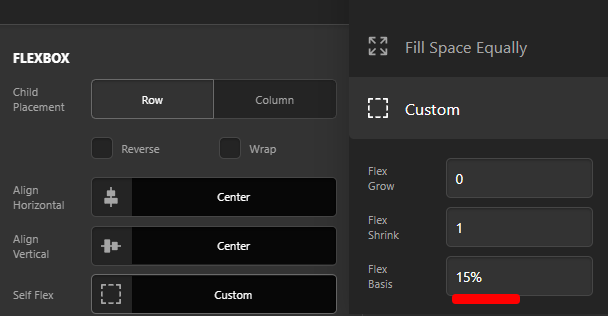
Like above screenshot, let say you set the logo container to be 15%.
Then for the left and right container, try to use calc to substract that 15% from default 100% width and then divide it by 2. The result will be the Self flex value of left and right container
First container Self flex: calc((100% - 15%) / 2)
Second container Self flex: 15%
Third container Self flex: calc((100% - 15%) / 2)
That way we are sure left and right got the same width. Check this calc function guide.
Hope this helps.
You guys are just wonderful 
Thanks! That worked perfectly!
You’re most welcome!
This topic was automatically closed 10 days after the last reply. New replies are no longer allowed.
