Pro Header Creator CSS and JS not being shown

Hi there,

I moved from X to Pro today and in turn have recreated my header within Pro including the custom CSS and JS I used to change the class added to the header to alter it during scroll down.

However this isn’t reflected within the Header creator. I have to go the actual site - http://staging.dwanedigital.co.uk/ in order to see if my CSS or JS had the desired effect or not.

How come you can’t see the JS/CSS within the header creator? I have cleared my caches also.

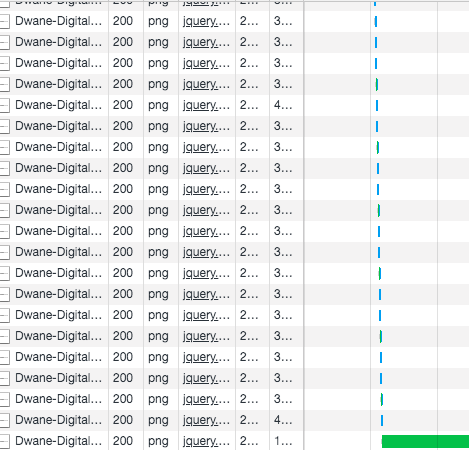
In addition I’m having a problem in which whenever I scroll the JS seems to be loading an image which is a problem
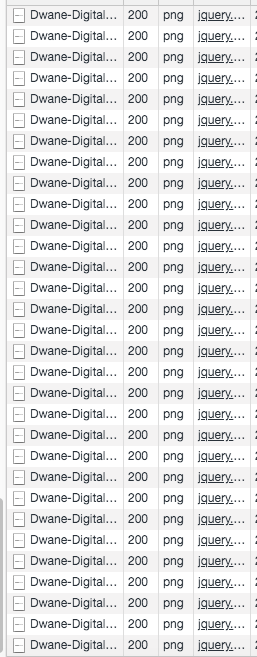
Here is my JS

if($(window).width() > 980){
jQuery(document).ready(function($) {
$(window).scroll(function() {
	var scrollPos = $(window).scrollTop(),
	navbar = $('.e269-1.x-bar');

	if (jQuery('body').hasClass('home')) {
		if (scrollPos > 100) {
			navbar.addClass('alt-color');
		} else {
			navbar.removeClass('alt-color');
		}
	} else {
		if (scrollPos > 1) {
			navbar.addClass('alt-color');
		} else {
			navbar.removeClass('alt-color');
		}
	}
});
});

jQuery(document).ready(function($) {
$(window).scroll(function() {
	var scrollPos = $(window).scrollTop(),
	navbar = $('.e269-1.x-bar');

	if (jQuery('body').hasClass('home')) {
		if (scrollPos > 100) {
 $('.e269-1.x-bar .x-image img ').attr('src','//staging.dwanedigital.co.uk/wp-content/uploads/2019/09/Dwane-Digital-Logo-Black.png');     
		} else {
			$('.e269-1.x-bar .x-image img ').attr('src','//staging.dwanedigital.co.uk/wp-content/uploads/2019/09/Dwane-Digital-Logo-White.png');
		}
	} else {
		if (scrollPos > 1) {
			 $('.e269-1.x-bar .x-image img ').attr('src','///staging.dwanedigital.co.uk/wp-content/uploads/2019/09/Dwane-Digital-Logo-Black.png');
		} else {
			$('.e269-1.x-bar .x-image img').attr('src','//staging.dwanedigital.co.uk/wp-content/uploads/2019/09/Dwane-Digital-Logo-White.png');
		}
	}
});
});
}
Hi Ryan,

Your JS code is incorrect and is generating a JS error, you need to place the condition inside document.ready like this:

jQuery(document).ready(function($) {
  
  if($(window).width() > 980){
    
    $(window).scroll(function() {
      var scrollPos = $(window).scrollTop(),
      navbar = $('.e269-1.x-bar');

      if (jQuery('body').hasClass('home')) {
        if (scrollPos > 100) {
          navbar.addClass('alt-color');
        } else {
          navbar.removeClass('alt-color');
        }
      } else {
        if (scrollPos > 1) {
          navbar.addClass('alt-color');
        } else {
          navbar.removeClass('alt-color');
        }
      }
    });
    
  }
  
});

jQuery(document).ready(function($) {
  
  if($(window).width() > 980){
  
    $(window).scroll(function() {
      var scrollPos = $(window).scrollTop(),
      navbar = $('.e269-1.x-bar');

      if (jQuery('body').hasClass('home')) {
        if (scrollPos > 100) {
     $('.e269-1.x-bar .x-image img ').attr('src','//staging.dwanedigital.co.uk/wp-content/uploads/2019/09/Dwane-Digital-Logo-Black.png');     
        } else {
          $('.e269-1.x-bar .x-image img ').attr('src','//staging.dwanedigital.co.uk/wp-content/uploads/2019/09/Dwane-Digital-Logo-White.png');
        }
      } else {
        if (scrollPos > 1) {
           $('.e269-1.x-bar .x-image img ').attr('src','///staging.dwanedigital.co.uk/wp-content/uploads/2019/09/Dwane-Digital-Logo-Black.png');
        } else {
          $('.e269-1.x-bar .x-image img').attr('src','//staging.dwanedigital.co.uk/wp-content/uploads/2019/09/Dwane-Digital-Logo-White.png');
        }
      }
    });
    
  }
  
});

Let us know how it goes.

Hi Jade,

That still doesn’t fix the logo being loaded every time the page either either scrolled up or down?

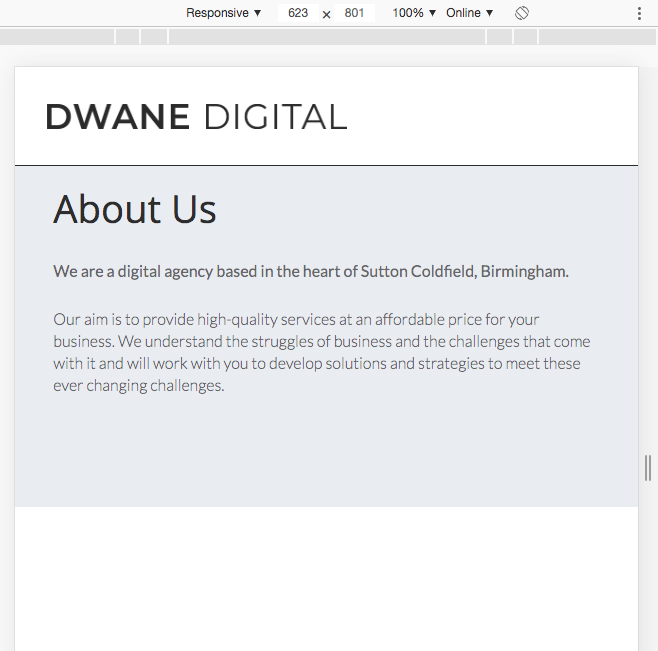
And it also breaks the JS code as the JS still runs on windows smaller than 980

And the custom CSS and JS within the header still isn’t shown within the header creator page?

Hi Ryan,

Please understand that the JS code you have is originally suggested for X (standard header), since you’re now using PRO please remove that JS, it would be better if you do these within the capability of PRO’s Header Builder, it will going to save you from hassle overtime.

To do this, please remove the custom JS first, then duplicate your Bar, the original bar will be your none sticky transparent header. Turn off the Sticky Bar option of this original bar.

Now the duplicate (2nd) bar will be your fixed bar navigation, with a white background-color, black logo, and black menu text. Set this bar to be a Sticky Bar and Hide Initially


Hope it helps,
Cheers!

Hi Friech,

Ah okay, I have managed to get that to work, however the transition between the two isn’t like what I had before.

I’ll add this new header to the site - http://staging.dwanedigital.co.uk

and this is what I would like the transition to be (like I have currently)

As you can see it’s smooth and you don’t notice it changing but with the new one it slides in from the top rather than just change upon scroll

Hello Ryan,

You are having a different effect because the sliding down bar is different from the one bat that initially displays. To resolve your issue, you will need to remove the second bar and update the JS code into this one:

jQuery(document).ready(function($) {
  
  if($(window).width() > 980){
    
    $(window).scroll(function() {
      var scrollPos = $(window).scrollTop(),
      navbar = $('.e272-1.x-bar');

      if (jQuery('body').hasClass('home')) {
        if (scrollPos > 100) {
          navbar.addClass('alt-color');
        } else {
          navbar.removeClass('alt-color');
        }
      } else {
        if (scrollPos > 1) {
          navbar.addClass('alt-color');
        } else {
          navbar.removeClass('alt-color');
        }
      }
    });
    
  }
  
});

jQuery(document).ready(function($) {
  
  if($(window).width() > 980){
  
    $(window).scroll(function() {
      var scrollPos = $(window).scrollTop(),
      navbar = $('.e272-1.x-bar');

      if (jQuery('body').hasClass('home')) {
        if (scrollPos > 100) {
     $('.e272-1.x-bar .x-image img ').attr('src','//staging.dwanedigital.co.uk/wp-content/uploads/2019/09/Dwane-Digital-Logo-Black.png');     
        } else {
          $('.e272-1.x-bar .x-image img ').attr('src','//staging.dwanedigital.co.uk/wp-content/uploads/2019/09/Dwane-Digital-Logo-White.png');
        }
      } else {
        if (scrollPos > 1) {
           $('.e272-1.x-bar .x-image img ').attr('src','///staging.dwanedigital.co.uk/wp-content/uploads/2019/09/Dwane-Digital-Logo-Black.png');
        } else {
          $('.e272-1.x-bar .x-image img').attr('src','//staging.dwanedigital.co.uk/wp-content/uploads/2019/09/Dwane-Digital-Logo-White.png');
        }
      }
    });
    
  }
  
});

And we need the css code that you have added before.

This topic was automatically closed 10 days after the last reply. New replies are no longer allowed.