PRO Footer - Columns in containers

Hi Guys,

I hope you can help. I basically want to create something similar to the below for my footer but i’m getting stuck because i cant have columns in a container.

I want a background block with a border radius and then a title at the top and then three columns below containing the contact details. I used one of your footer templates (gradient that was close and have 3 buttons in a container but want to be able to be able to put more items below the middle and right column but cant as they add as buttons to the right. Here is what i have:

I did try a global container as i thought that i could do this easily and it may be the best option but when i add a global block to the container, it has huge margins to the left and right and doesn’t fill the container (see below). Any advice or ideas?

Thanks folks,

Chris

Hi Chris,

Thanks for reaching out.
Sometimes the only screenshot doesn’t help us to recognize the issue you are having. Can you please provide login credentials for your site in a secure note to examine it further, including:

– WordPress Site URL & Login URL
– WordPress Admin username/password

To create a secure note, click the key icon underneath any of your posts.

Thanks

Apologies @tristup. Secure note with details attached.
Thanks,

Chris

Hi Chris,

Thanks for providing all the details!

I went ahead and check your Test Footer and adjust the layout to fit with your design. What I did is create a nested columns so that you can add more buttons at the center and at the right content.

You can now adjust the layout the way you wanted. Please note that I deleted the Global Blocks content you have added to your Test Footer Layout.

Hope that helps.

Thank you.

Hi @marc_a, I knew there would be a simple answer! haha. Thank you for your help. Much appreciated :+1:

Last question, how can i reduce the gap between the buttons vertically? Is that also possible?

thanks again,

Chris

Hello Chris,

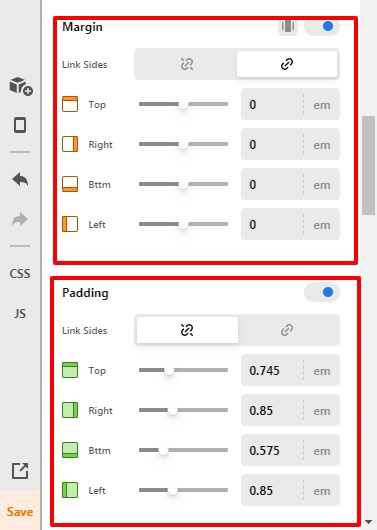
You can check for the margin and padding of the Button element. Please have a look at the given screenshot below.

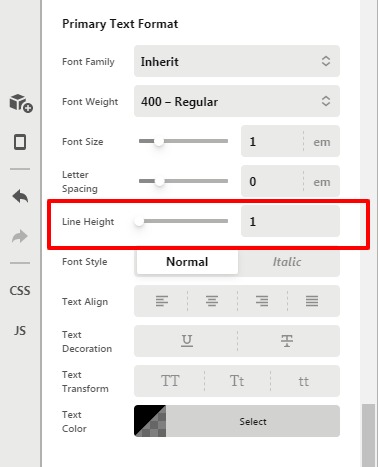
I would also recommend you go to Text format —> Line-height.

Activity-Content-Pro1

Hope it helps
Thanks

Hi @prakash_s. Yep thats the one! I have found it now. Thanks very much :slight_smile:

You’re very welcome, Chris!

This topic was automatically closed 10 days after the last reply. New replies are no longer allowed.