Pro Footer Background Color Incorrect

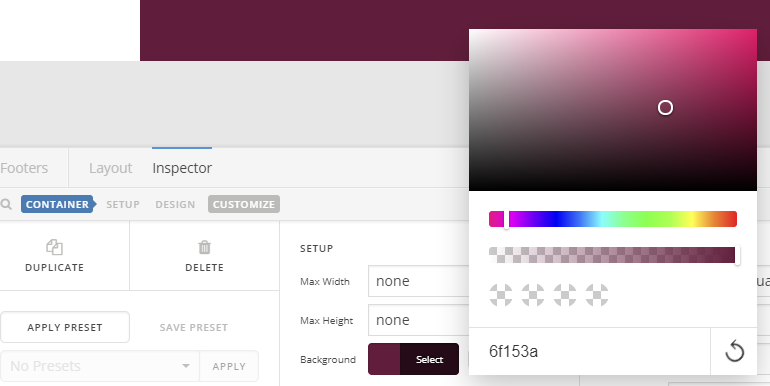
I’m experiencing a problem in which the background color that I specify for the footer is not the color that is used. In the footer builder I specify hex color 6f153a and then close the color picker. But if I then do a screen capture of the color swatch I find that the color has shifted to 611e3c.

Please see the screen shot. Note that the hex value shown is 6f153a but if you check the Background color swatch (e.g., in Photoshop) it’s actually 611e3c.
Hi WPDave,

When you take a screenshot using any screen capturing tool, two parameters might alter the colors of this screenshot which are the color profile and compression quality. That explains why you will get different colors if you used any color picker tool on this screenshot because the colors have been altered already!

I got the color code of “#69203d” when I used a chrome extension color picker to pick the color of the screenshot you shared in your original thread.

One way to make sure the correct color code is being used as the footer background color is to use the color picker built in Chrome DevTools. Here you are a video I captured for you showing how to use this tool to verify the color used:

https://streamable.com/j0fg7

Thanks.

1 Like

Thanks, Alaa, that’s very helpful. That explains the discrepancy I was seeing. (I do have a color-calibrated monitor so the displayed color is presumably being modified by the calibration curve.)
Much appreciated,
Dave

On my behalf of my colleague, you’re welcome. :slight_smile:

This topic was automatically closed 10 days after the last reply. New replies are no longer allowed.