Pro Columns Acting Weird With 4 Column Layout

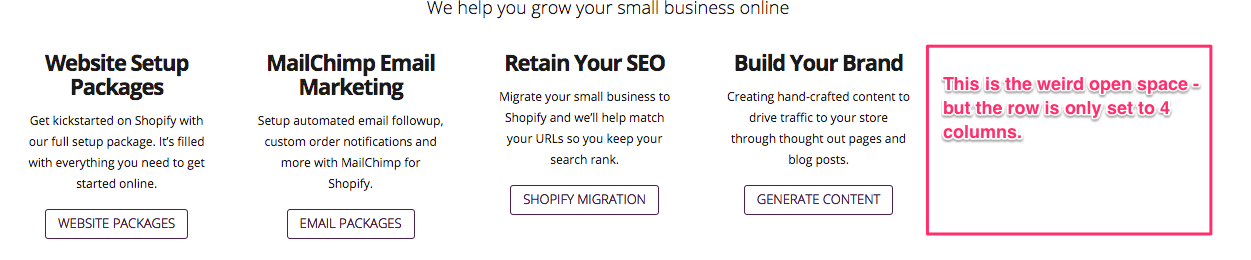
I have a weird thing happening and I suspect it has to do with some footer widget code I was playing with - but maybe not. When I make a row have 4 sections inside Pro (v.1.1.1) it is giving me 4 spaces but leaving room like for a 5th - but with no box or anything - just shoving everything over to the left. Any ideas what I broke?
Link: https://www.shopifyhelper.com
(homepage under slider rev section. Second row with all the text is only 4 columns - see photo)
Hey,

Would you mind providing us with login credentials so we can take a closer look? To do this, you can make a post with the following info:

– Link to your site
– WordPress Admin username / password

Don’t forget to select Set as private reply. This ensures your information is only visible to our staff.

Secure note added above. Thank you!

Hi There,

The issue is because of your custom CSS. See this: https://screencast-o-matic.com/watch/cb6T63I9GQ
Please remove the following custom CSS:

@media (min-width: 980px) {
.x-column.x-1-4 {     
  width: 16% !important; 
  }
}

See how I add background colors to see the structure clearly.
It overrides default column width.

Hi,
If I do that then the footer widgets get moved around on desktop/laptop versions. What do I need to do to that section to make it stay the way it was with the above code?
Thanks!
Kate

Hi Kate,

You can update that css code to this:

@media (min-width: 980px) {
footer .x-column.x-1-4 {     
  width: 16% !important; 
  }
}

So it will only affect the 1/4 columns that is on the footer.

Cheers!

Perfect! Thank you!

You’re welcome, have a nice day.

Cheers!

This topic was automatically closed 10 days after the last reply. New replies are no longer allowed.