Pro Child style.css Version Number Not Updating in Head Tag

Hello! We’re having an issue with our child theme’s style.css file. I assume that the version number in the top part of the file should automatically feed into the head tag, thus updating styles with a simple page refresh rather than a hard reload. Here’s what I mean:
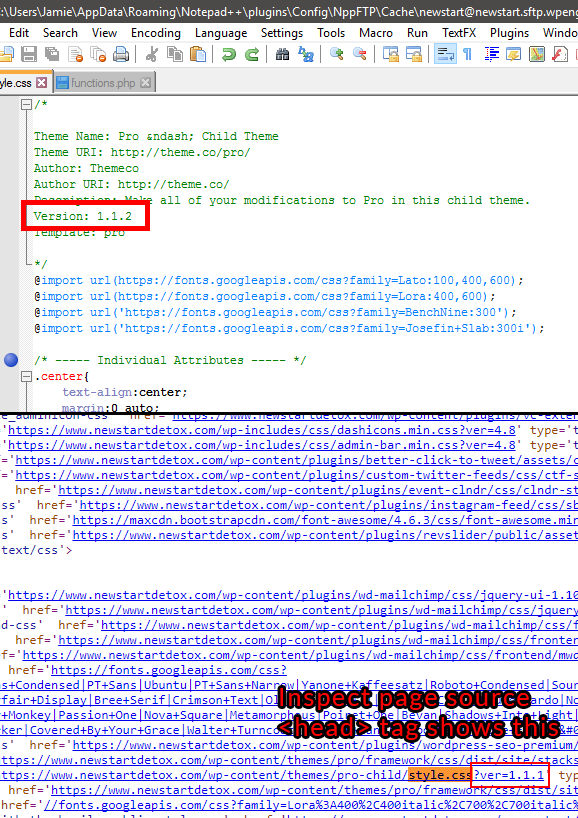
Shouldn’t changing the file version update the version number in the head tag?

Hey there,

The version number comes from the parent theme (current version of Pro is 1.1.1). It is irrelevant in updating styles as you can add style in your child theme’s style.css and it should take effect after saving provided you cleared all caches including your browser cache.

It is technically possible to load your child theme style’s version number but that would require custom development which is outside the scope of our support. We do have an in-house custom development team that offer paid services, who may be able to assist. They can be contacted at [email protected] if this is of interest to you. If you have any further questions about the theme, we are more than happy to provide you with assistance on these inquiries.

Thank you for your understanding.

Thank you Xian. We were able to get around the issue with this piece of code in the pro-child/functions.php file:

add_action( 'wp_enqueue_scripts', 'my_theme_enqueue_styles', 11 );
function my_theme_enqueue_styles() {
    wp_enqueue_style( 'theme-styles', get_stylesheet_directory_uri() . '/style.css', array(), filemtime( get_stylesheet_directory() . '/style.css' ) );
}

This updates the browser cache based on style.css’s file time stamp rather than a static version number.

1 Like

Great idea. Thank you for sharing this with us.