Pro 5.x Bug report: Integrity stack css override element styles for Line element in Cornerstone editor

When in the cornerstone editor, I have found that sometimes the Line element disappears from the editor view, though it is still accessible via the page outline view. On first load, all Line elements are visible, and then they seem to disappear when any changes are made to that Line element.

Using inspect element, I was able to see that the generated CSS styles created by Cornerstone for the element are being overridden by the default .x-line styles from the Integrity stylesheet.

This is not an issue in the front end, where the styles are correctly applied and all Line elements are visible.

Hi @arthurodb,

Thanks for reaching out.
I have checked it in different browsers but have not been able to replicate it. The Generated CSS, always overrides the CSS coming from the selected stack in the Page Builder view.
I would request you please mention the device, browser name and version, and also the operating system you are using, which helps us to replicate the issue at our end.

Thanks

Hi Tristup,

I have had the same thing happening in three different browsers: Chrome, Safari and Firefox (developer edition), all on an M1 MacBook pro. Chrome is on version 94.0.4606.71, Safari on version 14.1.2, and Firefox on version 93.0b9

I know that normally the generated CSS overrides the stack CSS, but in this instance, the generated CSS for the Line element only (as far as I can see) is being overriden.

Further to my initial report of this issue, here is a more exact description of the effect of this bug:

  1. On loading the Page Builder, all Line elements show exactly as expected
  2. Changing any style control of any element in the page causes the Line elements to disappear (because of styles being overridden, as shown in my previous screenshot)

Using Inspect Element on the Page Builder iFrame, I have found that when the Page Builder is first loaded, there are three CSS rules contributing to the border style of the Line element. The first two shown below come from x-stack.min.css.
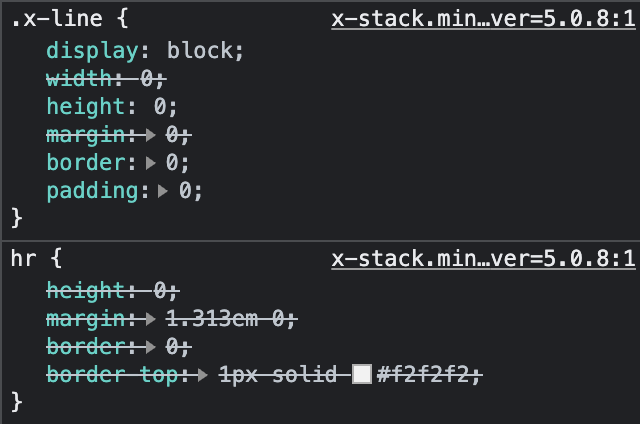
image

The third, which overrides the first two on first load, is the generated CSS of the Line element:

Then when a change is made to the Line element, and the Line elements in the Page Builder all disappear, there are five CSS rules contributing to the border style of the Line element. The two extra ones now come from integrity-light.css, and it is the .x-line rule from this CSS that ends up overriding the generated CSS.


Looking inside the <head> element of the Page Builder iframe, when the editor is first loaded, the <link> referring to the x-stack.min.css file is above the generated CSS, but when a change is made, a new <link> is added below the generated CSS, pointing to the integrity-light.css and loading in CSS rules that override the generated CSS.

I hope this helps in recreating the bug on your end and fixing the issue.

Hey @arthurodb,

We could not replicate the issue. This is what we have when using the Pro 5.0.8 and inserted the Line element in the builder.

Can you please create a video screencast so that we will have an idea of how we can replicate your issue?

Thanks.

I’ll add a link to a screen recording of the issue, showing how an extra few lines are added to the end end of the <head> tag when a change is made to the Line element.

I have managed to find the source of the issue though: it is to do with the CSS Minification being done by the SiteGround Optimizer plugin. Excluding integrity-light.css from the minification sorts the issue out.

It’s hard for me to see if this behaviour is due to a conflict on the Cornerstone side, or on the SiteGround Optimizer side though.

Hi @arthurodb,

Thanks for that information, unfortunately there is nothing we can do about that on our end.

  • In X, Pro, and Cornerstone we follow all the WordPress best practices for managing front end assets (CSS/JS)
  • We also minify those assets ourselves with each release. You shouldn’t need to use another system to minify them again.
  • By “minified” I mean that we run post processing to convert our human readable source files into much smaller files. Variable and function names are shortened, whitespace is removed, and other techniques are applied to produce valid javascript that takes up the least amount of space possible.
  • When it comes to optimization systems, the burden of responsibility lies primarily with that system. Our files are valid javascript, and should be a valid input, but there is a possibility of failure if the system doesn’t properly parse and handle those files.
  • What happens periodically, is that optimization systems like SiteGround’s minifier will not properly parse code that is already minified, resulting in broken output. There is nothing we can do about this on our end.

A good analogy would be imagining a set of physical parts that need to be shipped in a box. We take care to use space efficiently and package our parts neatly in the smallest box possible. SiteGrounds optimizer unpackages everything and sorts the parts again, then tries to repackage them in a new box. We don’t have control over that process, and there isn’t a way to ensure they don’t break things during that repackaging stage.

Our recommendation is to disable the minifier entirely. Unfortunately if you want to use it, there is the possibility of it failing.

Cheers,

1 Like

This topic was automatically closed 10 days after the last reply. New replies are no longer allowed.