Hi Team
50% lines showing fullwidth in Cornerstone and accurate on Front End


Bug?
Thanks
Sam
Hi Sam,
Thanks for reaching out.
I have assumed the probable setup and tried to replicate it in my local environment, but it looks exactly what it is showing in Frontend.
It will be very difficult to recognize the reason without investigating through the admin dashboard. I would suggest you please provide login credentials for your site in a secure note to examine it further, including:
– WordPress Site URL & Login URL
– WordPress Admin username/password
To create a secure note, click the key icon underneath any of your posts.
Thanks
Hello Sam,
The width of the Line element should work when added to the column. Take a look at this example:
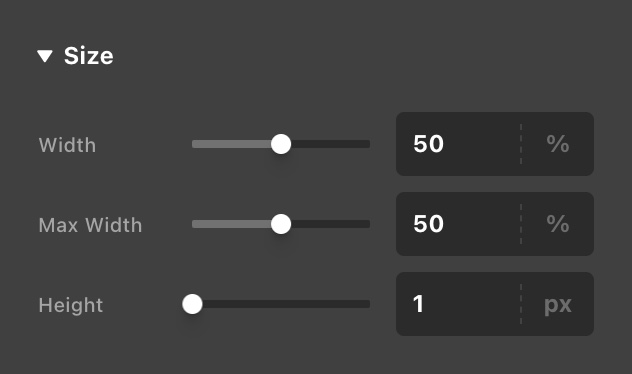
In your case, it is not displaying correctly because the line element is wrapped within the DIV element which is using the percentage % width unit, and the flexbox is enabled. The line element is also using the percentage unit for the width. To get around this, you must add a maximum width to the line element.
Line element’s size:
Preview Layout:
Best Regards.
Thanks @ruenel - that has sorted it. Odd that it shows okay on the front end and not the back end as I had it though. Nevertheless, it’s been sorted.
Cheers,
Sam
You’re welcome Sam,
Cheers,
This topic was automatically closed 10 days after the last reply. New replies are no longer allowed.


