Where is dynamic content? I’ve updated on staging and all looks broken here and there and dynamic content I can not even see?
See shared prints in secure note.
Cleared PRO cache and all cache instances.
Where is dynamic content? I’ve updated on staging and all looks broken here and there and dynamic content I can not even see?
See shared prints in secure note.
Cleared PRO cache and all cache instances.
Hello @Bracas,
Thanks for writing in! After doing the updates, always remember to clear all caches (if you are using WP Rocket, WP SuperCache or W3 Total Cache) when updating so that the code from the latest release is always in use. This will help you to avoid any potential errors.
And please clear your browser cache too. You may use private browsing mode in testing your site to make sure that you are viewing the latest codes from the updates and not the cached version in your browser.
If nothing is working, please provide us the WP access to your staging site so that we can investigate the issue.
Cheers.
Hi,
If you read all my lines of messages you would not need to tell me to clear cache:
https://tppr.me/BxTLD
The cache is not the issue but manage to solve it by making a hard reload today, which did not work yesterday. And the images is still “broken”, yes I do have selected image not icons as graphics but that should not trigger broken images when images in menu is empty, that should just not execute that code. How did you build this really? See here how you execute the code even if the field is empty: https://tppr.me/WTXke
Hi @bracas,
There is a server cache and there is a browser cache and hard reload is another process of clearing cache (browser cache to be specific). Hence, I still consider it cache related issue.
As for the images, you have shown a screenshot of broken images from the menu and it’s not dynamic content related. Confirmed it too by checking the actual page and the only images missing are from menu. For menu images, you need to manually configure it in Admin > Apppearance > Menus
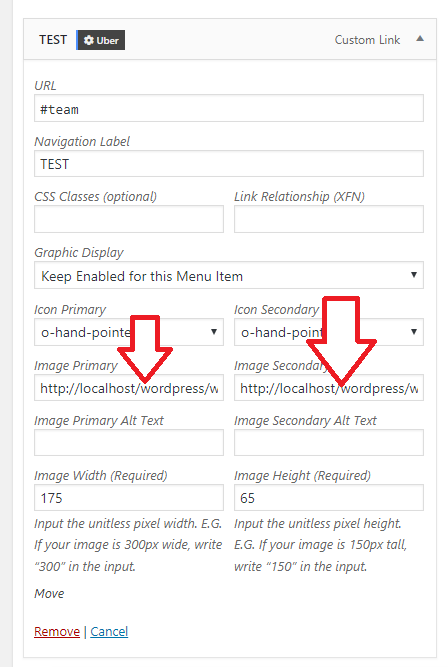
Thanks!
Yes I know all what you said above thanks.
As for the images, you have shown a screenshot of broken images from the menu and it’s not dynamic content related. Confirmed it too by checking the actual page and the only images missing are from menu. For menu images, you need to manually configure it in Admin > Apppearance > Menus
Yes but if it’s empty it should not output an empty image tag, it should just exclude outputting an image tag no? Just some feedback to your code, the way to solve it yes is to insert images or disable image and use icons or no graphics. Just giving feedback regards the code to your development team.
Finally saw some dynamic content but pretty clunky implementation but fun that you start improving the builder way behind the leading page builders.
Thanks ticket closed.
You’re most welcome.
This topic was automatically closed 10 days after the last reply. New replies are no longer allowed.