When selecting a page to edit in the content builder, an edit page link shows up at the bottom in the preview window.
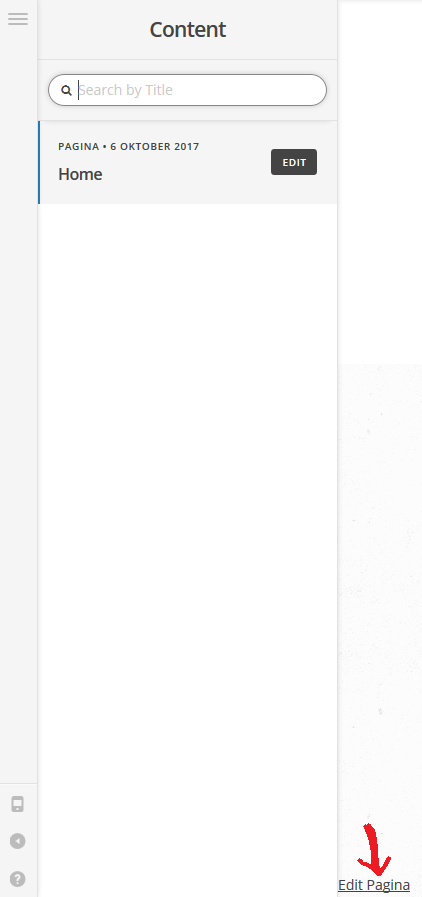
When selecting a page to edit in the content builder, an edit page link shows up at the bottom in the preview window.
Hi there,
Thanks for writing in.
I just tried it and I can’t reproduce this issue in my installation. Would you mind providing your site’s URL and admin login credentials in a secure note? I just like to test it directly and it’s a bug then I can forward it to our developer.
Thanks!
Sure, details have been added in a secure note.
Thanks!
Hi There,
Unfortunately, I can’t duplicate that screenshot of yours. Is that browser specific? What browser are you checking? See this: https://screencast-o-matic.com/watch/cb66hdICN6
Hi @Lely,
Thanks for checking it out.
This happens in both Firefox and Opera. I haven’t tested it in other browsers yet. Does it also not happen for you when you select the page in the list and the preview has loaded in the preview window on the right?
Hi There,
I missed it. Yes I can see that. It is intended so that when you scroll on the list of pages and then the selected page is out of view (thus the EDIT button on the right part of the page title is not accessible too), we can still have access to edit the page. See this: https://screencast-o-matic.com/watch/cb6lnPIGIu
I selected Explore page and the preview shows, when I scrolled down, this Explore page and its Edit link is out of view, now I can still choose to edit the page using that link.
Hope this helps.
That’s actually quite handy, cool!
I thought something was broken though as it looks kinda weird to have a simple link in the preview window. Maybe it could be styled a bit different to make it more obvious?
Hello There,
Thank you for the feedback. I have added this as a feature request so it can be taken into consideration for future development. All of these items are discussed with our team internally and prioritized based on the amount of interest a particular feature might receive.
Thanks!