Primary Particle Style Inline CSS

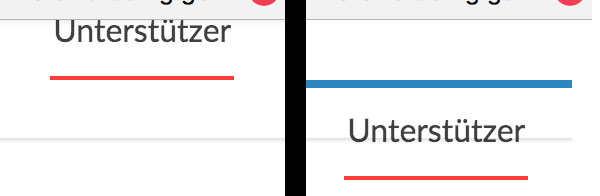
I’m using PRO. At the main navigation I like to have the red lines (when I hover) 12 px below the text but nothing I try with margin or padding in the Primary Particle Style Inline CSS field works.

How can I get this right?

Oh, now I see Primary Particle Style dosent work in FireFox only in Chrome - so how can I have the navigationtext underline when I hover (red line 12 px below text)?

It should look like this when I hover

Best,
Hermann

Hi Hermann,

Please see this: https://screencast-o-matic.com/watch/cbioj0l0eF
To move those red line particle, adjust the top and bottom margin of the element. Check on Firefox too after the changes on the margin. Let us know how this goes.

Hi Lely,

thanks, that seems to go in the right direction. But unfortunately even if I having 120px for Bttm Margin, the red line wont go up more than 34px. Thats really strange. An no red line on Frirefox.

Any idea?

Hello There,

Thanks for updating in! You are supposed to adjust the padding and not the margin. The bottom padding should expand the height. I also check your site in Firefox and the line is showing. Please check out my screenshot: http://prntscr.com/fwk463

Hope this helps.

Hi,

thanks for your answer. Unfortunately, no matter what option I choose padding or margin, it’s every time the same. Bttm moves line and text up, top moves both down. But the distance between line and text remains unchanged.

If you like I can hand you over the login so you can test yourself.

Hi There,

Please add the following CSS to Theme Options CSS

.hm5.x-menu > li > .x-anchor .x-anchor-content {

padding-bottom: 0px !important;
margin-bottom: 0.75em !important;
 }

Hope it helps!

You made my day. That works perfect. Thanks so much.

You’re most welcome.