http://asap.flywheelsites.com/service-and-repair/
How do I get the primary graphic image to stay next to the headline when I center up the headline.
This method brought it in closer to my text, but made it so my headline was not centered
http://asap.flywheelsites.com/service-and-repair/
How do I get the primary graphic image to stay next to the headline when I center up the headline.
This method brought it in closer to my text, but made it so my headline was not centered
Hey @turbineflats,
Did you also follow the 300px width? That width is not appropriate for your text. Try increasing it or using the percentage unit.
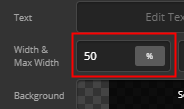
You might also want setting the right margin of your Graphic to 0 as that will make the whole setup off centered.

A width of 46% will center your headline and image icon like this:

One thing to take into account also is your mobile view. Once you finished setting up your desktop, your mobile will look like this.

There’s no option to scale the image on mobile so for simplicity, you might want to remove the graphic from your design instead. Otherwise, please tell us how you’d want it to look on mobile so we could take everything into account for best setup.
Thanks.
This topic was automatically closed 10 days after the last reply. New replies are no longer allowed.