Posts Page too large!

I’m using a news page or posts page to show updated content on our site, however, the layout of the posts and more importantly, the sizing of the images is way too big.

Is there a setting to adjust this from the default? Ideally, a 2 column page showing posts would be ideal, but I would settle for even single column but auto sizing images etc correctly?

It’s this page; https://garrettkitchens.co.uk/news/

Can you help?

Regards,

Mike
Hi Mike,

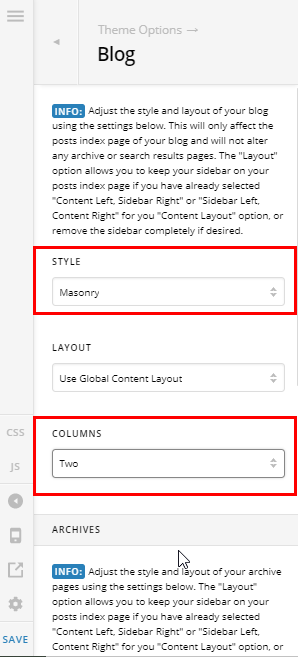
Thank you for writing in, please navigate to Theme Options > Blog then on the Style please select Masonry and the Column option will show, you can choose either 2 or 3 columns.

Hope it helps,
Cheers!

1 Like

I tried this but didn’t work! Maybe I should have cleared cache - thank you very much, looks a million times better now!

Glad to hear it’s sorted, Michael. :slight_smile:

This topic was automatically closed 10 days after the last reply. New replies are no longer allowed.