Posts Page in Cornerstone

Hi there, I’m trying to edit my posts page but I can’t with cornerstone. I’ve now seen a few articles where you have answered peoples questions about the topic, saying that it simply can’t be done in cornerstone. However, when I set up demo content, the posts page was consistent with the rest of the demo content, which means it got that way somehow. I have edited all of the demo content fo other pages in cornerstone, so I’m wondering how I can do the same to the posts page, as it needs to be consistent with the rest of the website. Can you offer any solutions?

Thanks,

Ken
Hello There,

Thanks for writing in!

Are you referring to the Posts Page as in the blog index? The Posts Page is the page that you have assigned in Settings > Reading > Front Page Display > Posts Page. This page is not editable with Cornerstone or with the default WordPress editor. Any contents on this page will be discarded and WordPress will display the recent posts you have added. To know more about the Posts Page, please check this codex: https://codex.wordpress.org/Creating_a_Static_Front_Page#Creating_a_Static_Front_Page

If this is not what you are referring to, please clarify a little further and include url as an example or even some screenshots so that we will have an idea of what you have in mind.

Thank you very much.

Hello Ken,

Thanks for updating in! Yes I have seen the difference with the sidebar. This is weird because they are on the same post format and category yet displays differently. There must be something in the child theme like code or settings that is doing this. Could you please give us access to this site so that we can investigate further?

Regards.

Hi There,

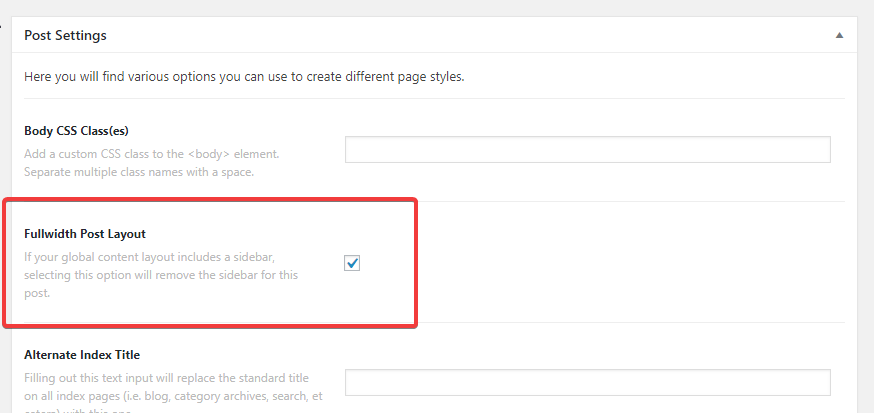
Your test post doesn’t have the sidebar because you’ve checked on Fullwidth Post Layout option:

To display the sidebar, you have to uncheck this option.

I’m able to edit your posts with Cornerstone as well(see the link in Secure Note). I could see that you’ve installed the WP Fastest Cache plugin. I recommend you to temporarily turn it off while your website is still under development.

Regards!

Yes thanks, I found the settings in X to let me edit posts in cornerstone, and thanks for the cache tip. I understand the full layout and side bar bit, but I wondering where the image at the top of the sidebar is, and how to remove or edit it.
Thanks

Ken

Glad it’s okay now, and yes, it’s widget and list the posts, and you can change the image by changing the featured image of displayed post. Thanks!

This topic was automatically closed 10 days after the last reply. New replies are no longer allowed.