Hey @SANDBOX,
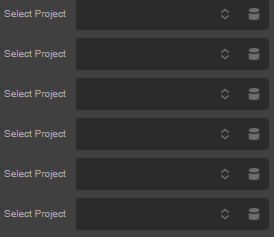
In Cornerstone / Pro, you cannot query posts dynamically inside the parameter JSON definition itself (such as using a "posts" block inside "options"). Cornerstone does not have a built-in "posts" options parser, which is why your dropdown renders empty.
To populate a select control with a dynamic list of posts, you must register a custom dynamic option using PHP (the Cornerstone Dynamic Options API) and then reference it in your parameter JSON.
Since the solution requires custom PHP coding, it falls outside standard support. However, you can implement this yourself by following the sample recommendation below:
1. Register the Dynamic Option (PHP)
Add this PHP code to your child theme’s functions.php file or a custom plugin. This queries the project posts and returns them in the format Cornerstone requires:
add_action( 'cs_dynamic_content_register', function() {
  cs_dynamic_content_register_dynamic_option( 'project_list', [
    'filter' => function( $results, $args ) {
      $posts = get_posts( [
        'post_type'      => 'project',
        'posts_per_page' => 100, // Limit the query to prevent builder slowdowns
        'post_status'    => 'publish',
        'orderby'        => 'title',
        'order'          => 'ASC',
      ] );

      $options = [
        [ 'value' => '', 'label' => __( 'Select a Project', 'cornerstone' ) ]
      ];

      foreach ( $posts as $post ) {
        $options[] = [
          'value' => $post->ID,
          'label' => $post->post_title,
        ];
      }

      return $options;
    },
  ] );
} );
2. Update your Parameter JSON
Once registered, point the choices attribute of your select parameter to the dynamic option key (dynamic:project_list). You can define a repeatable list parameter. This allows the user to add, remove, and reorder projects dynamically in the builder. To enforce the maximum limit of 6, you simply slice the array in your element’s PHP rendering file so that it never displays more than 6.:
"selected_projects": {
  "type": "group[]",
  "label": "Selected Projects",
  "itemLabel": "Project {{index}}",
  "params": {
    "project_id": {
      "type": "select",
      "label": "Select Project",
      "options": {
        "choices": "dynamic:project_list"
      }
    }
  }
}
3. Add this to your child theme to fetch the selected parameters and limit the array to a maximum of 6:
// 1. Get the array of selected items from the builder parameter
$projects = isset( $data['selected_projects'] ) ? $data['selected_projects'] : [];

// 2. Limit the display to a maximum of 6 items
$projects_to_display = array_slice( $projects, 0, 6 );

// 3. Loop through and render the selected projects
foreach ( $projects_to_display as $item ) {
  $project_id = $item['project_id'];
  if ( ! empty( $project_id ) ) {
    // Render your project markup here (e.g., using get_post($project_id))
  }
}
I’d like to remind again that this is beyond the scope of our support and the sample custom setup above is not tested. That only serves as a guide to help you get started extending Pro. You will need to consult with a developer to make it work on your site. If you need more suggestions, please consider subscribing to our One support.
Thanks.