I have a post that I want to copy.
It is not showing in the Posts lists so I cannot copy it.
The page is live and I can view it.
If I use the search function the post shows and I can open to edit it.
Post is titled ‘RankMath SEO: How to Optimize Your Content for Maximum Engagement’ and should be showing in the attached screengrab.
In the second grab you can see it shows in search.
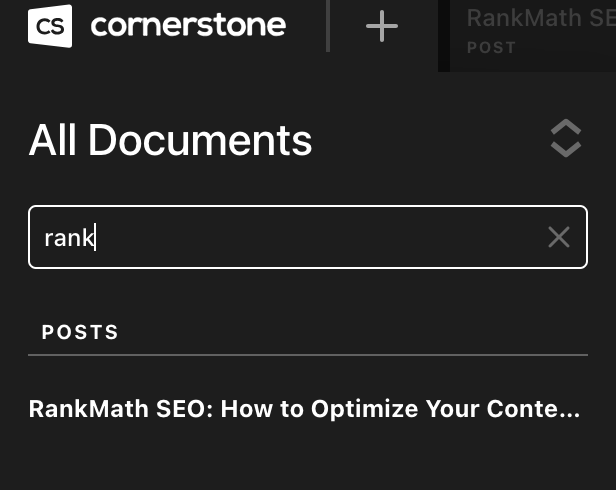
This is a bit of a mystery.
Hi Edward,
Thanks for reaching out.
Sometimes the only screenshot doesn’t help us recognize the issue you are having. We need to examine your site to determine the cause of the issue.
Hope you will not mind sharing your website login credentials in a secure note to examine it further, including:
– WordPress Site URL & Login URL
– WordPress Admin username/password
To create a secure note, click the key icon underneath any of your posts.

Thanks
1 Like
Hi Edward,
Thank you for providing the credentials. Upon checking, I see your post is not being recognized as Cornerstone post, this usually happens when you have edited the post outside the Cornerstone or this could happen due to conflicts. Please check for the following first:
-
Ensure everything is up to date according to our version compatibility list at https://theme.co/docs/version-compatibility. Please follow the best practices when updating your theme and plugins. See https://theme.co/docs/product-updates for more details.
-
If you’re using a caching plugin, clear all caches including browser cache then deactivate your caching plugin and other optimization plugins. If you’re using a CDN, please clear the CDN’s cache and disable optimization services.
-
Test for a plugin conflict. You can do this by deactivating all third party plugins, and seeing if the problem remains. If it’s fixed, you’ll know a plugin caused the problem, and you can narrow down which one by reactivating them one at a time.
-
Deactivate your child theme if using and switch to parent theme.
Let us know how this goes!
Hi, thank you for thee feedback.
I have done everything on the list you supplied and still the post does not show in the list.
The post does still show when I search for it and is live on the website.
The post was created by copying another post.
There is another issue with this.
Maybe it is related?
I created the post in the category ‘Digital Marketing Blog’ then changed that to ‘seo-search-engine-optimization.’
When I check that post in SemRush i shows the original post and that it is redirected.
Something is causing automatic redirects which I do not want.
There is also another post that I created in the same way
(Which has disappeared completely)
and both these are showing as redirected in SemRush
I cannot trace these redirects to anywhere that I have setup.
There is something very strange going on.
Hi Edward,
I have checked and found that the specified post is not showing in the post list. I suspect this might be some other reason behind it, I would like to suggest troubleshooting the following common issue to help us to recognize the reason.
1.Theme Related Issue
2.Plugin Conflict
3.Theme Update related issue
4.Child Theme Related issue
5.CSS/JS Customization
6.Disabling Cache
7.Disabling CDN
If you discover that an issue is coming from a custom code or 3rd party plugin, kindly consult with a developer or contact the plugin author. Please note that we do not provide support for custom codes and 3rd party plugins.
I would also request you activate any of the default themes like TwentyTwenty and check if the issue persists or not. If the issue only exists with the Pro, please copy your live site to a staging server so we could troubleshoot freely without breaking your live site.
And give us access to the secure note, including:
– WordPress Site URL & Login URL
– WordPress Admin username/password
To create a secure note, click the key icon underneath any of your posts.
Thanks
Thank you for your reply.
I have set CloudFlare to developer mode.
I have again disabled all plugins and I still do not see the post in the CornerStone list.
The post is visible in the WordPress Posts list and has the edit with Cornerstone link and it opens to edit.
If I change the themeco to TwentyTwenty cornerstone is not there and I cannot replicate the issue.
Hey Edward,
The default sorting is just only set to 100 that’s why the other pages/posts are not showing. To fix your issue, you need to add this filter to override the default value. Please add the code below in your child theme functions.php and it should do the trick with your clone existing page and search option.
// number of posts to limit in search
add_filter("cs_locator_limit", function() {
  return 200;
});
Hope that helps.
Hi, yes thank you, that post is now showing.
I do still however have an issue with this post, and another one.
Firstly this post is being redirected. I did not set any redirection for it and cannot trace where that is coming from.
Also at the same time that I made this post I made another one.
This disappeared completely but that page as appears in SemRush and is redirected.
I don’t know why that post disappeared and where the redirections are coming from. I manage those myself with RankMath.
Any help with this would be greatly appreciated.


Hey Edward,
There could be some plugin that redirects the posts to another link because our theme doesn’t have any hidden functionality about redirection. You may try checking this troubleshooting.
Just want to let you that this redirect issue is outside the scope of our theme support. You may seek 3rd party developers to help you with your problems or you can avail One where we can answer questions outside of the features of our theme.
Hope that helps and thank you for understanding.
Yes I understand,.
Main issue was solved.
Thank you for great support.
Hey Edward,
You’re welcome!
This topic was automatically closed 10 days after the last reply. New replies are no longer allowed.