Post Meta Link Not Working

This one seems pretty odd to me… on two of my blog posts, the category and comment links under the title don’t work.They actually don’t show up as being links at all. I’ve only found this issue on two posts, the rest work fine.

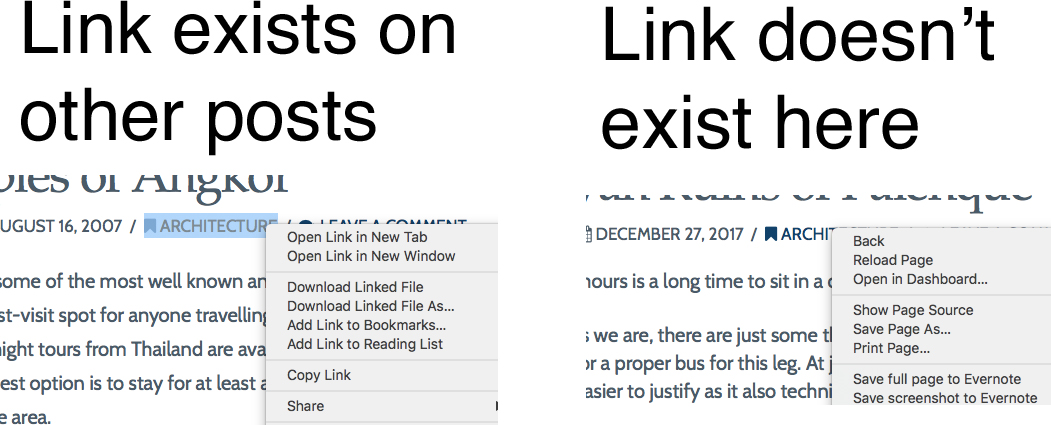
This is one of the posts, the “Architecture” and “Leave a Comment” buttons. I’ve asked around to others, and it seems to be working fine for them, but I’ve tried it on two different phones and two different desktops, and used three different browsers - all with cleared cache - and the links don’t work on any.

The image below are screenshots of right clicking the buttons
Hi there,

Thanks for posting in.

What device you’re testing it with? I checked and both category and leave comments are clickable on my end. Right-clicking it displays a context menu with Open link. Would you mind providing a video recording of the entire page while showing the issue?

Thanks!

I used a MacBook, a Lenovo laptop with Windows, and two iPhones. Tried with Chrome, Safari and Firefox. I encountered the problem every time.

Someone managed to find some CSS to resolve the issue, but I’m still a little unsure of why it happened to begin with.

This is the code that fixed the problem:
.x-section{margin-top:0!important}

I also found that this issue only happened on blog posts that I built with Cornerstone rather than just text, but again, not sure why that would have caused the issue.

Any explanation would be greatly appreciated in case of future issues!

Thanks again

Hi,

There is a negative margin top set to your sections which causes it to overlap the post meta, covering your links and preventing it from working.

Yellow part is the first section.

So adding the code .x-section{margin-top:0!important} will fix the problem.

Thanks

1 Like

This topic was automatically closed 10 days after the last reply. New replies are no longer allowed.