We have portofolio parent called Products and four children underneath signifying four product categories. Each child has many entries. We cannot figure out how to only display the four children only and the entries of each child when selected, otherwise the display is too complex. Any ideas?
Hello George,
Thanks for writing in!
I am not fairly sure how you want to display the but let me try give you a solution.
- From Portfolio > Portfolio Categories click on the view button and copy the URL of the category.
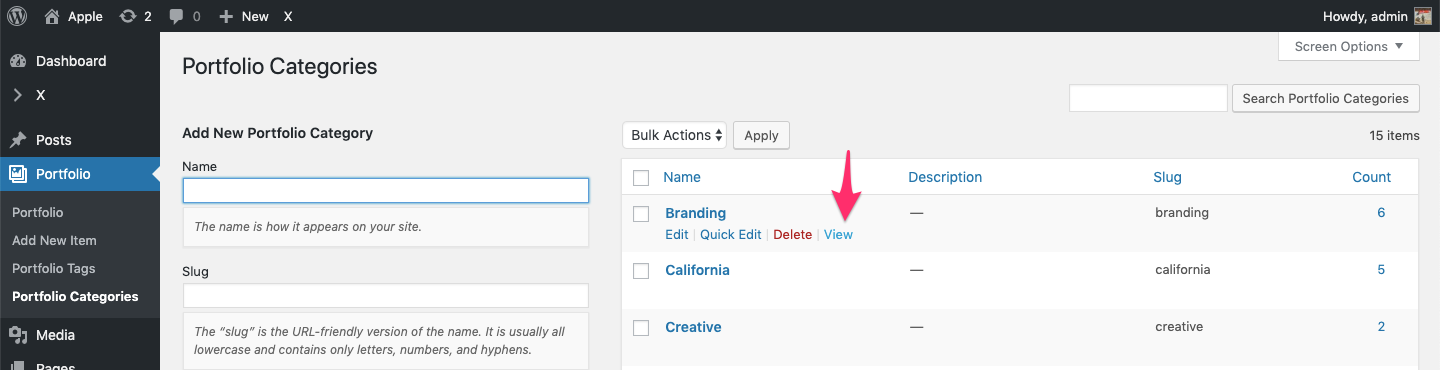
- To display the categories there are multiple options. Either you can display using Menus or inside a page using buttons etc.
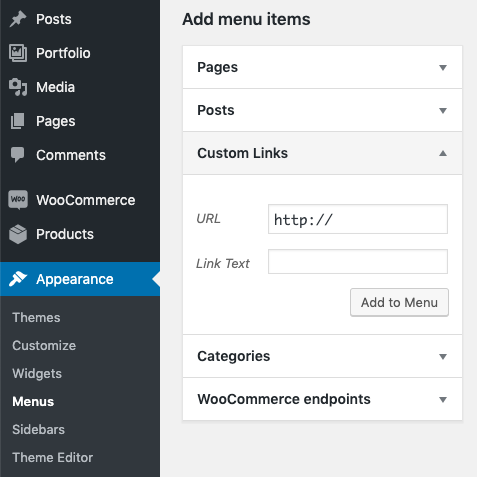
- To display using Menus, navigate under Appearance > Menus > Custom Links. In URL box add the URL that you got from Portfolio > Portfolio Categories in step 1.
- You can also display the categories using buttons in a page. Edit the page using Cornerstone and under Elements add a button element. In URL box, repeat step 1.
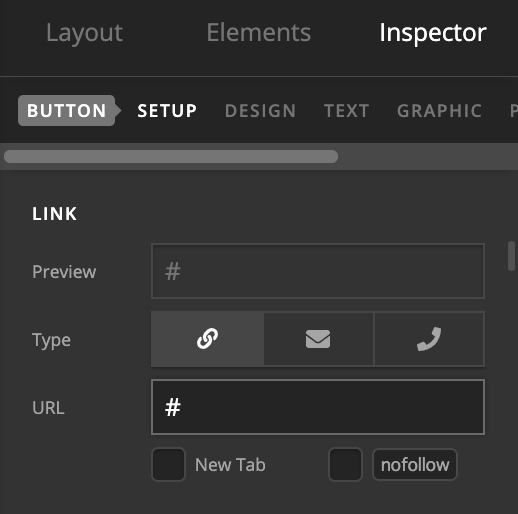
In case solution suggested above is not what you are looking for then please elaborate the question and we will be happy to assist you further.
Thanks.
This topic was automatically closed 10 days after the last reply. New replies are no longer allowed.