Portfolio Page Not Found Error

All of my portfolio pages are suddenly showing Page Not Found errors. The pages look fine in WP, although the cornerstone editor does not seem to be working.
I cleared my WP cache and tried disabling Cornerstone plugin, but neither helped. I checked the custom URL slug is not “portfolio” as suggested here https://theme.co/apex/forum/t/404-page-not-found-error-ever-feel-like-youre-in-the-wrong-place/16067

My portfolio grid: http://zachchristman.net/index.php/portfolio/

What else can I try?
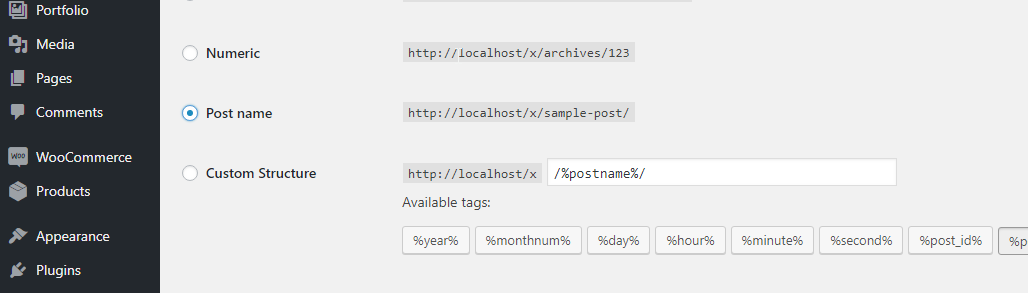
Hi There,

Please navigate to Settings > Permalinks > change to Post name > then save the setting:

And check if your hosting mod_rewrite is enable by creating a file phpinfo.php with content,

<?php phpinfo();?>

Upload this file and browse via Browser. So you know which modules are enabled. You need mod_rewrite enable to remove index.php from URL.

More details please check this link: http://codex.wordpress.org/Using_Permalinks#Using_.22Pretty.22_permalinks

Also test for a plugin conflict. You can do this by deactivating all third-party plugins, and see if the problem remains. If it’s fixed, you’ll know a plugin caused the problem, and you can narrow down which one by reactivating them one at a time.

Hope this helps.

Changing the permalink setting fixed it! Thanks so much!

You are most welcome. :slight_smile:

This topic was automatically closed 10 days after the last reply. New replies are no longer allowed.