Hi there,
I am currently building a website with the Icon stack. However, I would like to have a similar filter as the Integrity stack. I found a code from the support archive but it doesn’t really work for me, is there a way to fix this?
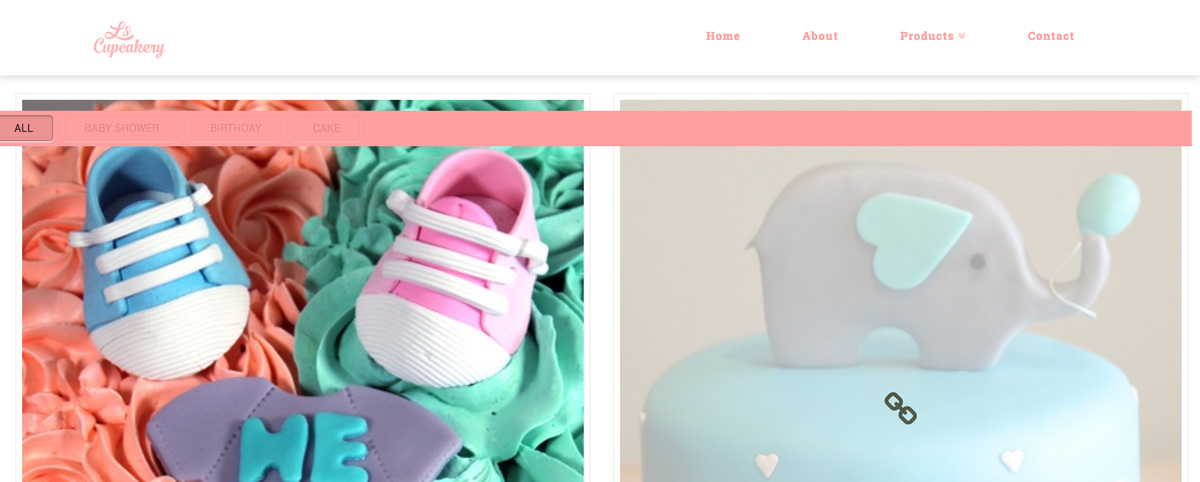
That’s the code I used:
.page-template-template-layout-portfolio .x-breadcrumbs-wrap {
  float: none;
  display: block;
  width: 100%;
}
.page-template-template-layout-portfolio .x-landmark {
  display: block;
  width: 100%;
  padding: 0px;
}
.page-template-template-layout-portfolio .x-landmark-breadcrumbs-wrap {
  display: block;
}
.option-set {
  margin-top: 0.87533em;
  margin-bottom: 0;
  float: none;
  width: 100%;
}
.option-set li {
  display: block;
  text-align: left;
}
.x-portfolio-filters,
.x-portfolio-filter {
  display: inline-block;
  float: none;
  position: relative;
  margin: 0.45em 0.375em;
  border: 1px solid #ddd;
  border: 1px solid rgba(0, 0, 0, 0.125);
  padding: 0.692em 1.154em 0.769em;
  cursor: pointer;
  font-size: 13px;
  line-height: 1.3;
  text-align: center;
  text-transform: uppercase;
  vertical-align: middle;
  color: #c5c5c5;
  color: rgba(0, 0, 0, 0.375);
  background-color: transparent;
  border-radius: 0.35em;
  box-shadow: inset 0 0 0 transparent, 0 1px 1px rgba(255, 255, 255, 0.95);
  -webkit-transition: color 0.3s ease, border-color 0.3s ease, background-color 0.3s ease, box-shadow 0.3s ease;
  transition: color 0.3s ease, border-color 0.3s ease, background-color 0.3s ease, box-shadow 0.3s ease
}
@media (max-width: 767px) {
  .x-portfolio-filters,
  .x-portfolio-filter {
    font-size: 11px
  }
}
@media (max-width: 480px) {
  .x-portfolio-filters,
  .x-portfolio-filter {
    font-size: 10px
  }
}
.x-portfolio-filters:hover,
.x-portfolio-filter:hover {
  color: #777;
  color: rgba(0, 0, 0, 0.75);
  border-color: #cfcfcf;
  border-color: rgba(0, 0, 0, 0.25);
  background-color: #fff;
  background-color: #fff
}
.x-portfolio-filters:active,
.x-portfolio-filter:active {
  color: #777;
  color: rgba(0, 0, 0, 0.75);
  border-color: #bbb;
  border-color: rgba(0, 0, 0, 0.25);
  background-color: #ebebeb;
  background-color: rgba(0, 0, 0, 0.075);
  box-shadow: inset 0 1px 2px rgba(0, 0, 0, 0.225), 0 1px 1px rgba(255, 255, 255, 0.95)
}
.x-portfolio-filters {
  margin: 0;
  display: none;
}
.x-portfolio-filters-menu {
  margin-top: 1.313em;
  text-align: center;
  position: static;
  background-color: transparent;
  width: 100%;
  float: none;
  display: block !important;
  text-align: left;
}
.x-portfolio-filters-menu li {
  display: inline-block
}
.x-portfolio-filters-menu .selected {
  color: #777;
  color: rgba(0, 0, 0, 0.75);
  border-color: #bbb;
  border-color: rgba(0, 0, 0, 0.25);
  background-color: #ebebeb;
  background-color: rgba(0, 0, 0, 0.075);
  box-shadow: inset 0 1px 2px rgba(0, 0, 0, 0.225), 0 1px 1px rgba(255, 255, 255, 0.95)
}
.x-portfolio-filter {
  display: inline-block;
}
.x-portfolio-filters-menu li a {
  display: block;
  padding: 0.5em 1.75em;
  color: #c5c5c5;
  color: rgba(0,0,0,0.375);
}
.x-portfolio-filters-menu li a:hover {
  color: #777;
  color: rgba(0,0,0,0.75);
  border-color: #cfcfcf;
  border-color: rgba(0,0,0,0.25);
  background-color: #fff;
  background-color: #fff;
}
.x-portfolio-filters-menu li a:first-child {
  padding-top: 0.5em;
}
.x-portfolio-filters-menu li a:last-child {
  padding-bottom: 0.5em;
}
Kindly