Portfolio entry featured hover background CSS stopped working

Good day,

I had the entry hover cover background color changed to black via Additional CSS, but now it is not working and went back to a white background. I’m not sure if this has to do with the recent update or not, but it was working until I added additional CSS for the entry-featured CSS. I tried to remove that CSS but it is still showing white instead of black. Here is the current portfolio CSS:

/* Blog and Portfolio */
.x-portfolio .entry-featured
{ padding: 0;
border-color: #673695;
border-width: 3px; }
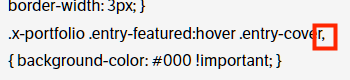
.x-portfolio .entry-featured:hover .entry-cover,
{ background-color: #000 !important; }
.single-post .entry-footer.cf
{ background-color: transparent; }
.x-portfolio .entry-cover-content span
{ display:none; }

website: artistryware.com
Themeco Login in secure note.

Also, when the hover slide in first appears it is white, with the white line at the side of the featured image. Is there a way to make this black as well?

Thank you,
Gregory Arndt
Hey Gregory,

We do not provide support for custom CSS. Please check your CSS for syntax errors or have a developer check your custom CSS for syntax errors.

If you need custom CSS guidance, we can do that in our One service.

Thanks.

Hi @christian,

Thank you for your response. My apologies for the delay in responding.

If I had simply asked how to change the background of the hover , you likely would have given me the custom CSS to accomplish this. If it didn’t work, then you would also likely check my site to see why. I’m not too sure how this is different as I had gotten this CSS code from another forum post.

As I mentioned, the CSS was working and shortly after I updated the Pro theme it stopped working. Is it possible that the theme may have changed the class in a way that would cause the .x-portfolio .entry-featured:hover .entry-cover CSS to stop working?

I also mentioned that it may have something to do with another CSS using Pro theme classes. This is why I included all of the CSS that pertains to the portfolio. Is it possible that there is an interaction between the .x-portfolio .entry-featured class and the .x-portfolio .entry-featured:hover .entry-cover that would cause it to no longer work?

When I had to rebuild my website recently I renewed my theme support contract. Are you saying that my support contract does not cover you checking this out for me?

Your help with this matter is greatly appreciated.
Thank you

Hey @GregoryArndt,

Our theme support does not include custom CSS guidance. We can only do that in our One single platform support. To remove doubts, please refer to our Terms.

Your issue is not because of the update. There’s a syntax error in your CSS so therefore, you should fix your CSS. I’ll point you to the error this time but we will not provide CSS help next time.

image

Thank you for understanding.

Hi @christian,

Thank you for the response. I apologize for not understanding what my support contract entails. I appreciate your help and I will pay more attention in the future.

Hi Gregory,

You are most welcome.

This topic was automatically closed 10 days after the last reply. New replies are no longer allowed.