Portfolio Categories are not working/page is returning 404

Hello,

I’m having two issues with my site.

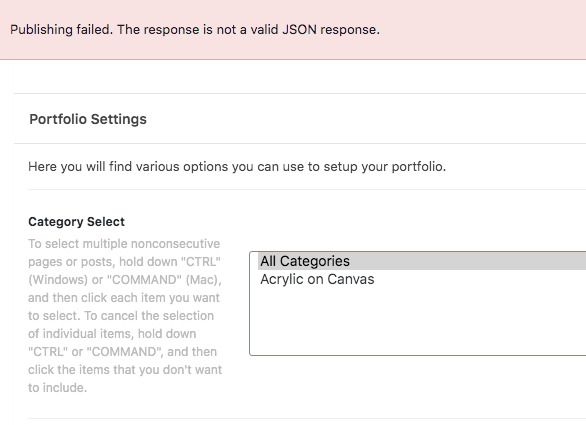
  1. Only one Portfolio Category is showing up when I edit a Portfolio post. I have created several of them so I do not know why they aren’t appearing.

  2. I have a page called /paintings that is returning a 404. I have disabled all plugins. Refreshed the permalinks, and cleared the cache. I have even deleted the page and recreated it but the page will not display the contents only the “Oops…” message.

Please help!

FYI - My end goal is to be able to use the Layout - Portfolio on whatever page I want and set whatever category I created so that those specific posts appear on the set pages.
Hey Gabe,

For issue #1, that is because only 1 category has posts. The rest of the portfolio categories has 0 posts.

For issue #2, there seems to be a conflict with your permalink setup. All subpages of your Art Portfolio Page returns 404 which should not be happening. I tested your setup in my site and subpages work. Please try hard resetting the permalinks by setting WordPress htaccess to the default values. You can read the instructions here: https://www.hostinger.ph/tutorials/wordpress-broken-permalinks

Hope that helps.

Hello Christian,

Thank you for the quick reply. I forgot to mention I already tried something similar but I followed those steps and it didn’t work. After I created the .htaccess file I deleted the “Paintings” page and tried to re-create it but now I get a JSON error.

I actually can’t hit “Publish” on any page without getting that error… For my first issue, I understand that the rest of the portfolio categories has 0 posts. That is my issue. The only two portfolio categories I can add on pages is “All Categories” and “Acryclic on Canvas”. Could you please look into this further?

Screen Shot 2020-05-11 at 12.18.56 PM

Hello again! I noticed when I view any page the WordPress admin tool bar is missing too!

[Update: I reverted the .htaccess change and the JSON error is gone.]

Hi Gabe,

Yes, I can see wordpress toolbar is missing on frontend. For that issue, let’s try basic troubleshooting first. See this article for some guidance: https://theme.co/docs/common-issues

No need to go through all of it. Please focus on the following conflict test:

Child Theme
Testing for Plugin Conflict

Do let us know how it goes.

Hello, as stated previously I have already turned off all plugins. I have already tried switching back to the parent theme but I am still getting all the aforementioned errors.

Hi Gabe,

A portfolio category will not show here:

If it does not have any portfolio post associated with it. You are seeing the “Acrylic on Burlap” there now because I created a test portfolio post and assign it with “Acrylic on Burlap” category.

Please don’t make your Layout - Portfolio template pages as a child of another Layout - Portfolio page, especially a child of the ART page, as you can see on your portfolio single page, the /art/ is used.

so if the URL says /art/paintings/ that means it will look for a portfolio post (which does not exist).

Hope that shed some lights,
Cheers!

Thank you Friech, that does make sense. Thank you for clarifying! I have made those changes and there are no more 404 errors. I still am not seeing the WordPress toolbar…I’ve already turned off all plugins and tested the theme as well as used a default .htaccess file. Could you help with this last task please?

Hi Gabe,

If by WordPress Admin toolbar you mean the top admin bar there are two places that you can control. The first one is the WordPress dashboard. Please kindly go to WordPress Dashboard > Users > Your Profile and enable the Admin Toolbar there:

Then, if you want to have the toolbar even when you are using the Pro builder please go to Pro > Theme Options, click the Settings icon on the bottom-left corner of the screen, then go to Preferences and enable the option below:

If you still can not see the toolbar please change the theme from Pro to another theme to see if it is something related to our theme or not.

Thank you.

I already tried changing the themes and that didn’t do anything. I checked my settings and my toolbar is still activated but not showing up on the site.

Hi Gabe,

The fact that the problem persists event without our theme being active shows it is not related to our product.
The only thing that we can be of help on this stage is to give you a Google Search here that might help you with your research to find the problem cause.

Thank you for your understanding.

Okay I understand. Thank you all for your support!

You’re welcome Gabe!
We’re glad we were able to help you out.

This topic was automatically closed 10 days after the last reply. New replies are no longer allowed.