Portfoio Items created / edited with Cornstone are ignoring the layout / rows / columns when displayed

Hi there,
( X theme 8.3.3. All plugins/theme etc up to date. Wordpress 5.7.1 up to date, Memory limit 512MB, php)
I am using cornerstone editor to create the Portfolio Item posts/content, but the view / layout (simple rows with 2 columns) are being ignored and display totally different when the page is saved and viewed.
I also removed all the Global and Post CSS to make sure that was impacting the view/output.

(https://www.methodtomadnessmedia.com/x/content/243)

See attached image.

I will provide an admin login to the site.
I will also put the Global CSS back as it was not the issue (removing it made no difference).

Please help!
Thanks in advance :slight_smile:

Hello Shauna,

Thanks for writing to us.

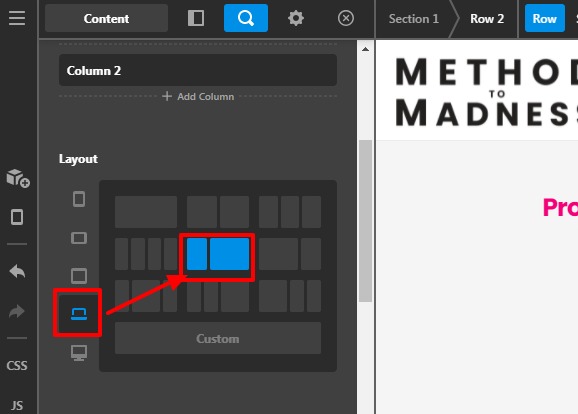
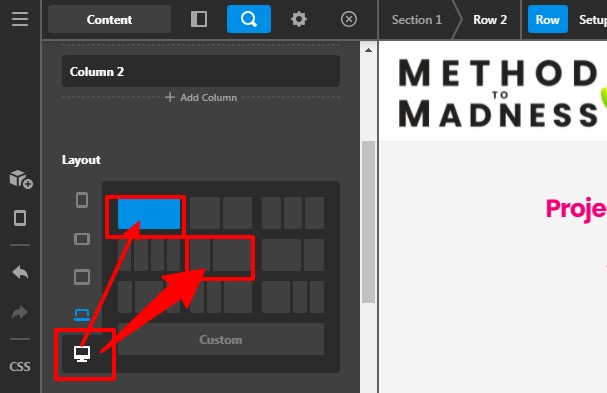
Thanks for sharing the credentials. I went ahead and checked your page content. It seems you had set the multiple columns layout for the Laptop device and you had set the one-column layout for the extra-large device that why when you are viewing to the frontend it is ignoring the multiple-column layouts and displaying differently as per backend mode.

Please set the same column layout for the extra-large devices.

Dating-No-Filter-E-Entertainment-Content-X

Dating-No-Filter-E-Entertainment-Content-X

I have edited in one Row please have a look at the frontend screenshot.

You can follow the same setting that I have set and mentioned with the above screenshot of Row settings.

Thanks

This topic was automatically closed 10 days after the last reply. New replies are no longer allowed.