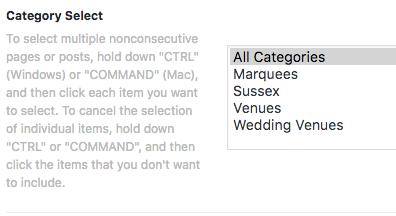
Hi Guys
My port folio page will not load unless you select something from the filter menu 1st, I just want it to load “all” by defult.
I’m wondering if it could be something to do with my custom css or child theme? can you help please?
border-style: solid;
166
margin-left: 5px;
167
padding: 1px;
168
padding-bottom: 2px;
169
}
170
171
172
/*WPCurve JWN 100676 End*/
173
174
/*WPCurve JR 143032*/
175
176
.x-main.full{
177
float:none !important;
178
}
179
.x-sidebar{
180
padding-right:22px !important;
181
}
182
.x-navbar .desktop .x-nav>li>a{
183
font-size:12px !important;
184
}
185
.x-landmark{
186
display:none;
187
}
188
.term-description{
189
font-size:30px;
190
font-weight:700;
191
}
192
/*WPCurve JR 143032*/
193
/*WPCurve JR 143519*/
194
#spanQuantity{
195
float:left;
196
padding-right:10px;
197
}
198
/*WPCurve JR 143519*/
199
200
/* WP Curve - JA - ticket 144670 start */
201
.curve-btn {
202
top: -55px;
203
float: right;
204
width: 100px;
205
padding-left: 0px;
206
padding-right: 0px;
207
font-size: 13px;
208
}
209
210
.page-id-11407 .curve-btn,
211
.single-product .curve-btn {
212
display : none;
213
}
214
/* WP Curve - JA - ticket 144670 end */
/* Change h tag size */
h1, .h1 { font-size: 55px; padding-top: 45px; padding-bottom: 20px;}
h2, .h2 { font-size: 40px; padding-bottom: 15px;}
h3, .h3 { font-size: 35px; }
h4, .h4 { font-size: 28px; }
h5, .h5 { font-size: 20px; }
/* Remove white space before headings */
h1, h2, h3, h4, h5, h6,
.h1, .h2, .h3, .h4, .h5, .h6 {
margin-top: 0;
}
p {
margin-bottom: 20px;
}
/* Align Stacked logo left */
.x-logobar {
text-align: left;
}
/* change footer height */
.x-colophon.bottom {
padding: 15px 0;
}
/* Add word \'Menu\" after hamburger icon - ALL stacks */
.x-btn-navbar i:after {
content: \"MENU\";
font-size: 24px;
padding-left: 12px;
}
[details=Summary]
[details=Summary]
This text will be hidden
[/details]
[/details]