Pop-Up Contact Form WITHOUT Plugin

Hi,

I tried to find if there’s a way to create a simple link based pop-out form without having to use a plugin like convertplus. But my research has only pulled up old x forum articles from 6+ years ago.

I’d like to rely less on 3rd party plugins.

There’s a link on that page that pulls up a CF7 form using ConvertPlus.
But if there’s a way to recreate this using lightboxes or another feature of X Pro, i’d much rather change it.

The fewer plugins the better.
Hi Jesse,

Thanks for reaching out.
Regretfully, there is no such option to show the contact form in a modal. Alternatively, you can try by adding the contact form shortcode into a Content Modal Area element to achieve this.
Please find the video where I tried to create a similar modal with contact form.
https://www.awesomescreenshot.com/video/1239041?key=6619283958455c4ac07ab06ca87bc144

Hope it helps.
Thanks

That could possibly work. What’s the CSS to edit the content of a modal? Specifically how to change it from the modal icon to text and then adjust things like colors and borders? That way I can make it say “Request a Quote” and possibly embed the modal within a global block and have that load on each product page in place of the text and convert plus shortcode.

Hi Jesse,

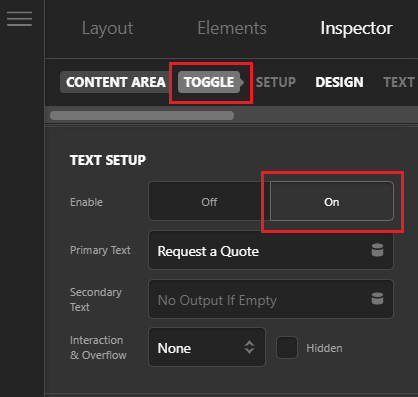
To change the modal icon to text simply navigate to the Toggle tab and turn on the Text Setup (see screenshot)

image

Under the Toggle tab you can customize the colors and borders as well. If you want to customize your contact form then you can take a look here https://contactform7.com/styling-contact-form/

To add it on each page, you can create a Global Block with Content Area Modal element and paste the Global Block shortcode on the pages where you want it to load.

Hope this helps!

This topic was automatically closed 10 days after the last reply. New replies are no longer allowed.