Play icon not functioning on classic video player

Hell Team,

The large play icon centered over the youtube videos on various pages on my client’s site are not working. You click on them and nothing happens. You have to go down to the lower left of the video to hit play there.

I tried using the V2 Video Player instead, which does have a working play icon in the center, but I could not figure out how to give it the thin grey border line around the video that the classic video element has by default. I tried setting the frame to 20px all around and choosing a frame background color but that did nothing but make the video oddly off-centered on the page.

So, could you either tell me how to correct the issue of the play icon not working on the classic video element, or tell me how to recreate the classic video element’s border line for the V2 video element? Thanks!

Example page where you can see this issue: https://asv1.com/our-work/dacor-2018-kbis/

Credentials to follow privately.
Hi There @blissville

Thanks for writing in! Upon testing classic video player, it seems to be a bug as I was able to replicate the issue on my end. I will add it to our issue tracker, so that our developers can further review it.

You can use V2 video element and then you can add the following CSS rule into your X -> Theme Options -> CSS area to set the border.

.x-video-embed {
    border: 1px solid gray;
}

Hope that helps.

Thanks for reporting the bug. I tried your CSS suggestion and it did not work. Do you have any others? Might there be a way via CSS to just remove that icon image from the classic video player until that bug is fixed? How will I know when the bug is fixed?

Thanks!
Rayna

Hi Rayna,

We cannot provide any ETA for fixes as bug fixing cycles are determined by developers internally.

I have updated your referenced page with V2 Video element and I have added the same effect by adding the following CSS rule.

.x-frame-video-embed {
    border: 1px solid #e5e5e5;
    padding:2.5%;
}

Hope that helps.

Thank you! Looks great. I really appreciate the help!

You’re more than welcome, glad we could help.

Cheers!

This topic was automatically closed 10 days after the last reply. New replies are no longer allowed.

Hey Rayna,

We’re sorry for the confusion. This is not a bug. The Classic Video Player element is only for direct video URL. like http://example.com/video.mp4. Though it will show the Youtube video, it won’t work as intended because it’s not a proper usage.

To get the solid gray border, you need to use the Class Embedded Video element.

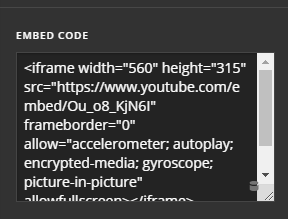
Then, you need to insert the Youtube video embed code like this:

You can get the embed code by clicking the Share link in Youtube’s video interface.

Hope that helps.