Picture size problem

Hey,

I have tree problems with pictures in that page :http://boloni.ma/nos-services/

1/ the effect that the title :NOS SERVICES ,do when you get on the page.i want to do it on all the titles of the pages of my website
2/ i want to make the picture on the right at the same size of the pic on the left (with the text in betwen them)

2/the picture up down ,I want to get it down a bit for it to be in front of the text
HEY,
WHY NO NOBODY CAN ANSWER THIS IT’S ABOUT 10 H.
I SHOULD FIX THIS PROBLEM.
Thanks

No one here to do support.i

Thanks

Hi There,

Sorry for the delay response!
This sometimes happens due to the volume of support ticket we got. We always try our best to reply as soon as possible.

For your query:

-1: Please select the Heading column and enable fade effect, adjust it as per the example page.

This can be repeated for all another page which has no effect.

-2. I can see you have set a width for the right side image, which is causing the issue. Please remove it.

-3. Exactly not sure what you want to achieve here, please clarify with a mockup or screenshot.

Hope this helps!

Thank you!

Hey,
NO problem.thanks for your answers.

1/I can’t find this heading column on the cornerstone.can you send steps how to do this with screen or something.

2/i delete the code but it stil the same problem.

3/the pic circled with red .i want to get it a bit down .

Thanks

Hi There,

  1. On the Layout panel A) collapse the section and B) inspect the Column.


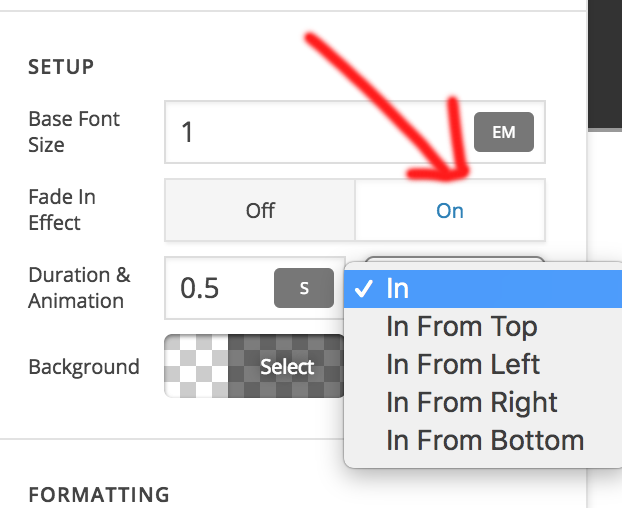
On the column inspector you’ll see a Fade In Effect option, turn that on and set the Duration & Animation.


  1. Inspect your second Image and add a CLASS page-img to it, like what you did to the other 2 images.


  1. Add a Classic Gap element on top of that Image and adjust the Gap size accordingly.

Hope that helps,
Cheers!

This topic was automatically closed 10 days after the last reply. New replies are no longer allowed.