Php 7.3 Fix - Have to use Cornerstone?

Saw the earlier threads about PHP 7.3 issues. We had the same style breakage issues (seems to remove styling) on latest Pro with PHP 7.3.

I reverted the sites back to 7.2, and all is fine, but WP Engine recommends moving to 7.3 as soon as possible.

I saw the earlier recommendation was to move to the latest version of Cornerstone also, which fixed the issue for a user. However, we don’t have Cornerstone installed and haven’t needed it so far.

Do we have to have Cornerstone installed with Pro in order to fix the PHP 7.3 issue?

Thanks.
Hi Alana,

Thank you for writing in, in PRO the Content Builder is built-in, so no you don’t need Cornerstone in PRO.

Would you mind to clarify what is the issue in PHP 7.3? Can you link the thread that you saw? The only thread I see that was related to PHP 7.3 issue is this. But the real issue here is the X and Cornerstone version is not compatible so we suggest to update both X and Cornerstone to the latest version.

Cheers!

Hi @friech -

Yes the thread you linked is the one I was referring to, so it sounds like it’s not applicable in our case with Pro.

We have Pro and have WP Engine as our hosting provider.

A while ago, WP Engine was running a process where they updated all their sites to php7.3. There was no opt out or deferment option. So we tested on our staging site ahead of the upgrade, and it stripped all of the styling out of our menus especially, and much of the rest of our pages. I can provide screenshots from our staging environment if helpful. So we had to roll back to php7.2 immediately after the automatic upgrade.

We are encouraged, though, to upgrade to php7.3 as soon as able. Wondering what we can try for troubleshooting/fixing this as it seems to be a theme/visual issue only. Hope these details help.

Ideas?

Hey Alana,

We have many customers using WP Engine and I believe they are using PHP 7.3 and Pro is working for them. I also am using PHP 7.3 in one of my sites and Pro also works.

This might mean that there’s something specific in your WordPress setup that is causing the issue.

I recommend that you test PHP 7.3 in your staging site and in there, activate the parent theme (if you’re using a child theme) and deactivate all third-party plugins. If Pro works, the issue could be coming from a third-party plugin. Activate the plugins one by one while checking each time if Pro works.

If none of the plugins is causing the issue, it might be that WP Engine had set a specific PHP 7.3 feature might conflict with Pro.

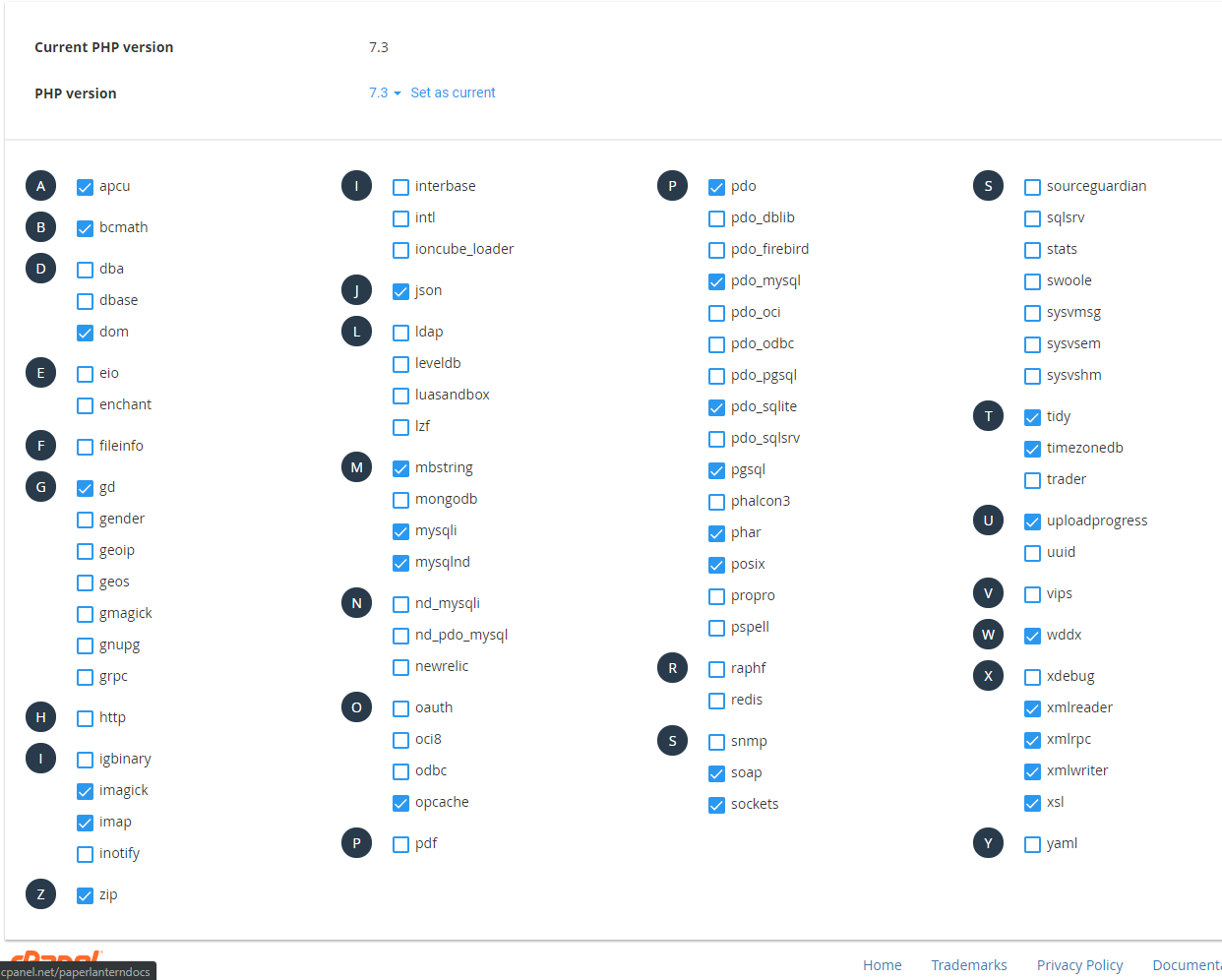
Please show the screenshot below to WP Engine support. The checked boxes are the settings that works for me.

If the issue is only happening in your live site, it could be due to caching. Please clear all caches and reset all permissions. Please ask the WP Engine support if you’re unsure how to do that.

Thanks.

Thanks, this gives us a place/process to start at least. Good to know it seems to be working for other Pro sites on php7.3 also.

It’ll take a bit for us to dig in and have results. I’ll message back on this thread with what we find.

Best.

Hi Alana,

I’ve checked the URLs associated with your licenses and it looks like you’re using an older version of Pro that came out before PHP version 7.3 was even released. In an update since then we did patch it to restore full PHP compatibility. I would advise updating your sites. Once they are on the latest version of Pro you shouldn’t see this issue anymore.

This topic was automatically closed 10 days after the last reply. New replies are no longer allowed.