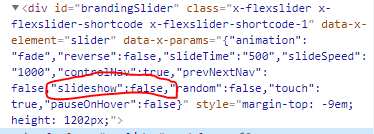
I’m using the Classic Slider element in Pro for a basic image slideshow. I’ve set it to automatically scroll through the images by toggling on the “slideshow” option. For accessibility reasons, I would like to have a play/pause button on the page that visitors can toggle to pause or continue the slideshow. Is there a simple solution for this?
I couldn’t find a simple solution so I decided to try with JavaScript. I added a button to the page that changes “slideshow” to “false” in the “data-x-params” attribute (pictured) but unfortunately that did not stop the slideshow from scrolling. Can you point me in the right direction? What parameter do I need to change to get the slideshow to stop moving?