Parallax in Pro

Hi There, try as I might I cannot get parallax to work. It was soooo easy in X - it just worked !

I have tried every combination and nope, it subbornly refuses !

I have background top full width images on all the pages apart from home page which has revolution slider. I wanted the page to slide over the top image.

Please could you point me to a tutorial or maybe just take a peek and see where I have gone wrong.

Many thanks.
Hi There,

Thanks for writing in!
The parallax effect is still there in new element and it is more powerful than earlier.
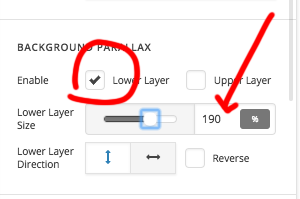
You can add the parallax effect to both the top and bottom layer of a section or column.

Just select which layer you have the image and increase the value to make it parallax.

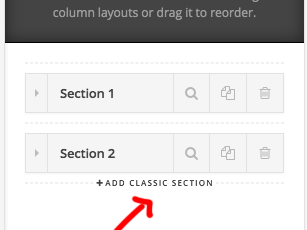
If you want to use classic section you can also do so.
Just hold Command key and add new classic section, it will add a old classic section where you can add the image background with parallax effect you want.

Hope this helps!

Thanks

Hi Basanta

Unfortunately I do not have the option to add a classic section.

I already have my settigs as you have displayed above, however the image still moves up and the bottom section does not come over the top like it should ie not working.

Kind regards

Hey Eileen,

Did you hold the Command key when you hovered above the Add to Section link. If you’re using Windows OS, the Mac Command key equivalent is Control. Here’s a demo so you can clearly see.

If you wish to continue using the new V2 section, you’ll need this custom CSS and provided you add the image as the lower layer. See https://youtu.be/3E9l2DbAOLA

.x-bg-layer-lower-image {
 background-attachment: fixed;
}

Hope that helps.

Well Christian - That did it - Many thanks much appreciated.

Now I just need to get rid of the double scroll bars and the jumping when I make the header sticky!!

Kind regards

Hello @Jimmmmmer,

Thanks for updating the thread. :slight_smile:

To resolve the double scrollbar issue you are facing (which I can confirm on my end too) please take a look at the solution mentioned in 3rd paragraph of following thread.

In case you have further question, please create a new ticket as this ticket is related with Parallax feature. Having different questions in same ticket creates lot of confusion and increases the response time.

Thanks.

No probs thank you for all your help - the auto worked :slight_smile:
Kind regards

On behalf of my colleagues, you’re welcome. Cheers! :slight_smile:

This topic was automatically closed 10 days after the last reply. New replies are no longer allowed.