We are using the Ethos 2 as a template.
With the parallax images, we would like to have a background image and be able to add a transparency filter to soften up the image a bit. Is this possible?
Thanks
We are using the Ethos 2 as a template.
With the parallax images, we would like to have a background image and be able to add a transparency filter to soften up the image a bit. Is this possible?
Thanks
Hi @PBwebmaster,
my-section class to your section: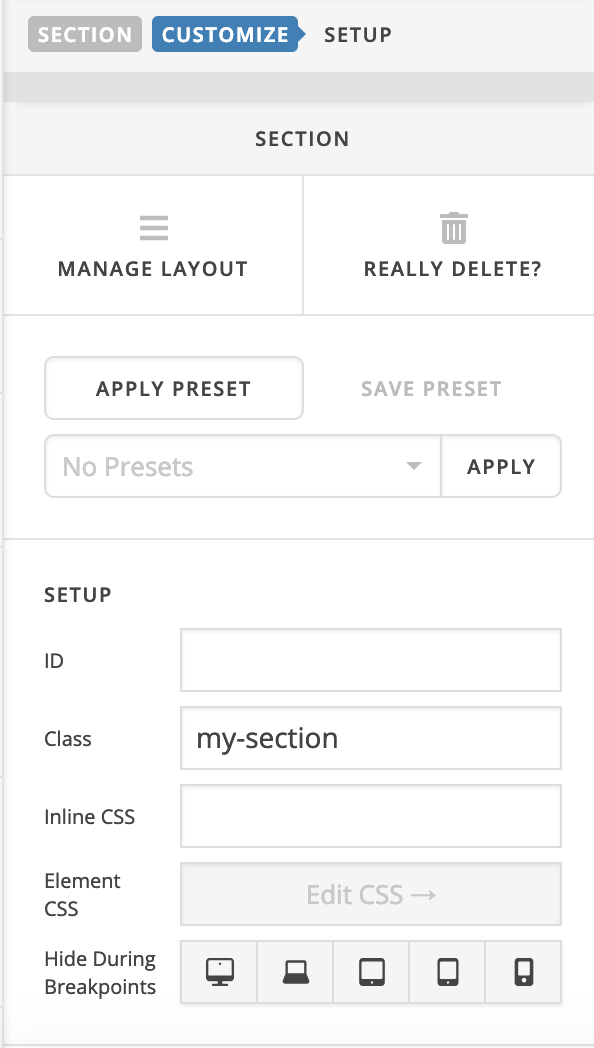
.x-section.my-section .x-bg .x-bg-layer-lower-image::before {
    content: '';
    width: 100%;
    height: 100%;
    position: absolute;
    background: rgba(255, 255, 255, 0.5);
}
Hope it helps 
Tried changing the CSS and adding my-section to the class. Doesn’t seem to be working.
Any other suggestions that we can try.
Thanks,
Hi Grant,
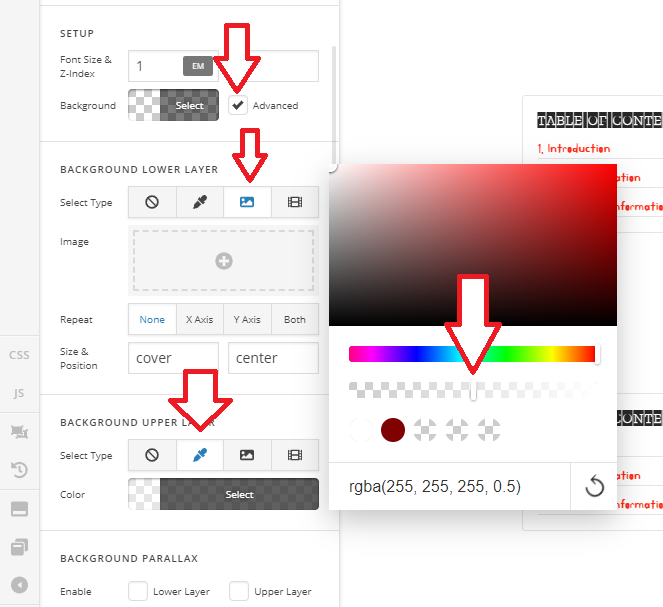
I don’t see this implemented anywhere. But if it’s just adding opacity, why not apply two backgrounds? One is image and one is background color with opacity.
Thanks!
Thanks, but it doesn’t look like we can have a background and foreground image in Parallax mode.
Just to make it simple for now we just did an overlay in photoshop.
Thanks for the suggestion though.
Hi Grant,
No, you can. Please enable the background advance mode, you should get the upper layer and lower layer background option and the parallax option for each as well.

I think you’re using the CLASSIC SECTION which has less options. You need to delete that and replace with a new Section.
Thanks,
This topic was automatically closed 10 days after the last reply. New replies are no longer allowed.