Page Width Adjustment Issue

Hi Support,

Can you advise me as to how best to change page width both individually and globally while retaining the header and footer, i have tried several settings including page width in the edit page section and on the x theme options but it doesnt seem to work.

The site is at https://www.john-hutson-school-of-dancing.co.uk/

Kind Regards

Mario
Hi There,

Thanks for writing in!

Looking at your design if you change your page width then it won’t be affecting the header section. But the footer width will change.
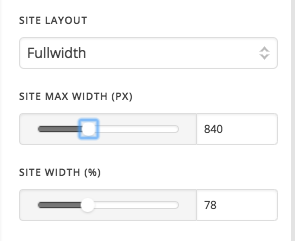
You can keep the footer with same via custom CSS and change the content width via Theme Option -> Layout and Design

You can increase the max width and the site width.
To keep the footer content the same width please add this CSS to your theme option -> CSS

.x-colophon.top .x-container.max, .x-colophon.bottom .x-container.max {
max-width: 1000px !important;
}

Hope this helps!

Hi Basanta,

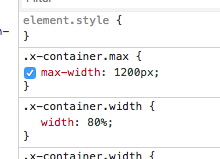
Many thanks for that, however i had tried that and its set on 1200 width PX & 80% both on fullwidth and it still only gives me 70% screen width. I would like to achieve a 80-90% page width if possible.

Kind Regards

Mario

Hi There,

Thanks for writing in!

I can still see the page width is 80% width, whereas you max-width set to 1200px.

Please increase the max width value to a maximum value like 2000px and site width to 90%. Let us know if that works.

Thanks

This topic was automatically closed 10 days after the last reply. New replies are no longer allowed.