Page sections and background image scaling options: learning about

Hello - I’m a little behind the curve on understanding how to control background images in Sections, Rows, and Columns. I keep wanting to place an image behind some text in a row and then find out that image gets distorted or cut off on smaller viewports. Any tips for getting my arms around the top 3-5 approaches to this? Is much of this related to Size & Position (e.g. center, cover, etc.)?

I sense that Parallax one of these options or approaches.

Thanks in advance!

Rich

PS: Adding a sample page where I am exploring different options.
https://wavelynxtech.com/sandbox/
1 Like

Hello Rich,

Thanks for writing in! I would like you to try this demo here: https://davidwalsh.name/demo/background-size.html which would explain how background image works.

We use the background-image: cover; which would cover the whole area of the container. This is responsive enough which will always cover the whole area. The only thing to consider here is that if your image size is smaller, it will be stretch out, and if you have a bigger image, it will get cut off.

Yes, we can use background-size: 100% 100%; which is also responsive but your image will either be stretch out or get squeezed depending on the size of the container.

Yes, we can also use background-size: 100% auto; but then as soon as you resize your browser or on smaller screen sizes, you will probably have white spaces around the image.

Or we can also use background-size: contain; but then this is not a good choice because you will see white spaces around your image.

Hope this helps.

Thanks, Ruenel - Yes, this helps! Nice sample page that guy has. So, I’m guessing that Parallax is just a variation of these cases with JS to support the scrolling behind the scenes.

By there way, are there any other background, full-width containers, or elements I should be aware of?

Thanks!

Hey Richard,

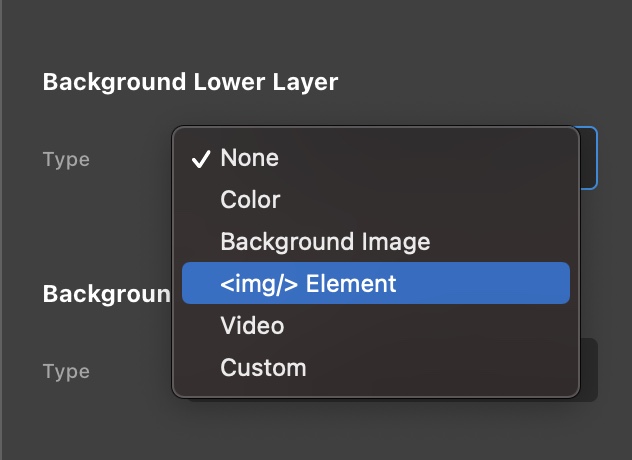
With the latest release, please be advised that you can now use the image element as a background.

Screen Shot 2021-02-11 at 10.36.54 AM

Play around with it to be more familiar and compare to the background image.

Regards.

This topic was automatically closed 10 days after the last reply. New replies are no longer allowed.