Page rendering normally in Cornerstone builder but layout is off on live page

Hi,

I have a staging site set up where I’ve been adjusting the layout of a landing page using the Cornerstone builder. In the builder mode, the page looks normal. But when I look at the staging site on the front end, some of the images are rendering strangely (stacked on top of one another rather than appearing in line). The footer was also appearing in the sidebar for some time, although I found a bit of code on another support thread that fixed that. Any ideas what the issue might be for these images though? I will send login details in a separate private thread.

Hello Marta,

Thanks for writing in!

I have checked the page and it turns out that you have inserted invalid HTML code in the content area.

Please go over to your page and review your HTML codes. Make sure that all div and paragraph tags were properly closed. Missing closing tags will only affect the front end and not in Cornerstone.

Please let us know how it goes.

Hi RueNel,

Thank you for pointing this out and I have made the fix to the code. However, this has not solved the issue. When I use inspector tools I can see that the second and third images (the ones that are rendering incorrectly, i.e. on top of one another in a column vs. in line horizontally) are displaying at a different size than the first image. I’m wondering if that could be causing an issue; the trouble is that when I view the images in the media library their specs look the same and although there are slightly larger versions of each image, the URLs I’m using are all for the smaller images. Can you let me know if you think this might be causing the problem and, if so, how I might rectify? Thank you

Hello Marta,

The contents of the content area element in section 8 has a broken code.
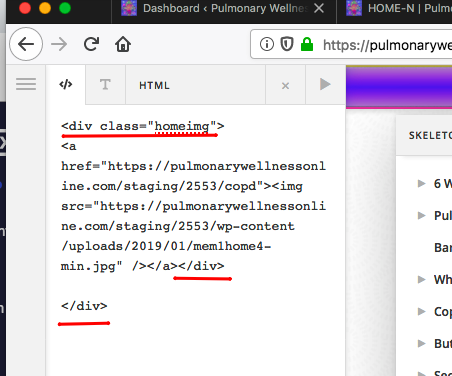
You need to check all 4 columns. And then I also found out that you added this html code in X > Theme Options > Header > Miscellaneous > Topbar Content:

<div class="home-header">
	<img class="border-img" src="https://pulmonarywellnessonline.com/staging/2553/wp-content/uploads/2018/09/glow-border.png">

	<div class="home-header-info groovybg">

		<div class="home-logo"><a href="https://pulmonarywellnessonline.com/staging/2553"><img src="https://pulmonarywellnessonline.com/staging/2553/wp-content/uploads/2018/10/ONLINE-ICON-bev-1-e1539549416333.jpg"></a>
		</div>

		<div class="logo-text">

			<img class="pw-text" src="https://pulmonarywellnessonline.com/staging/2553/wp-content/uploads/2019/01/pulmonaryWellness-min.png">
			<div class="online-pr"><img class="online" src="https://pulmonarywellnessonline.com/staging/2553/wp-content/uploads/2018/09/ONLINE-e1547157754315.png"><img class="pr" src="https://pulmonarywellnessonline.com/staging/2553/wp-content/uploads/2019/01/PulmonaryRehab-min.png"></div>

			<div class="sotas-ibl" ><img src="https://pulmonarywellnessonline.com/staging/2553/wp-content/uploads/2018/09/sotas-ibl-e1547157400386.png"></div>
		</div>


		<div class="society-logo"><a target="_blank" href="https://www.pulmonarywellness.com/society/"><img src="https://pulmonarywellnessonline.com/staging/2553/wp-content/uploads/2019/02/SOCIETY-ICON2-e1549953913629.jpg"></a>
		</div>

	</div>
</div>

Please be advise that the output of the topbar content is wrapped with a <p> tag. You cannot nest a <div> tag inside a paragraph tag. It will create issues. Please remove your custom code and find an alternative in modifying your topbar content.

Hope this helps. Please let us know how it goes.

Hi RueNel,

Ahhh, thank you for pointing out that extra ! Definitely a case where I had just gone blind to that :slight_smile: Thank you!

You’re most welcome!
We’re glad we were able to help you out.

This topic was automatically closed 10 days after the last reply. New replies are no longer allowed.