I’m having issue with page setup for my event. I would like to have full page to show the event information but for some reason this sidebar with menu wont go way. I already check the widget and dont have anything there. also the page template show no sidebar.
Hi there,
Thanks for writing around! Try adding the following CSS code in the Theme Options > CSS:
.mec-single-event .col-md-8 {
    width: 100%;
}
.mec-single-event .col-md-4 {
    display: none;
}
If this doesn’t help then please provide the event page URL so we can take a closer look and suggest you a solution accordingly.
Thanks!
I add the css but didnt worked.
here is the link for the event
http://nhwoodstock.org/new2018/events/escuela-biblica-de-vacaciones/
This sidebar is there because you have the “Navbar” set to “Fixed Right” as in this screenshot:
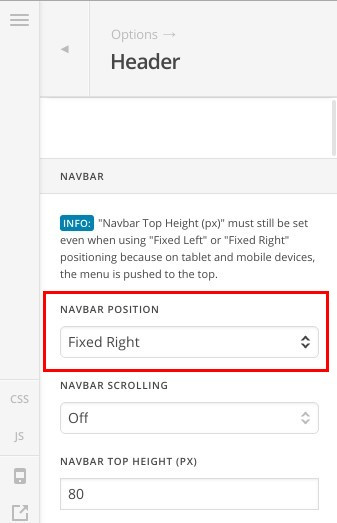
You can add this CSS snippet to (X > Theme Options > CSS) to hide it and get the page displayed in full width:
.x-navbar-wrap {
    display: none;
}
body.x-navbar-fixed-right-active {
    padding-right: 0;
}
.mec-events-event-image img {
    width: 100%;
}
Thanks.
Thank you for the fast support. problem fixed.
You are welcome 
This topic was automatically closed 10 days after the last reply. New replies are no longer allowed.